Scheduled Malware Scanning with ClamAV and Wazuh (Part 8)
How I added recurring ClamAV scans as a reporting layer on top of on-access protection, with clean Wazuh alerts and per-directory audit visibility.
Published · Republished on Medium

Files & Dependencies in this Post
text
files/clamav/scheduled/
├── default/
│   ├── scan.conf                    → TARGETS, MAX_FILE_SIZE, SCAN_WINDOW
│   ├── scheduled-scan.sh            → Scan script (source scan.conf)
│   └── scheduled-scan.cron          → Every 3h at :07
└── <host>/
    ├── scan.conf                    → Per-host override
    └── scheduled-scan.sh            → Optional per-host script override
config
files/wazuh/config/rules/
└── wazuh_custom_rules.xml           → Rules 101007/101008/101009
config
roles/clamav_scheduled_scan/         → Deploy script + cron + config
playbooks/wazuh-clamav-scheduled.yml
Depends on: Part 6 (mirror), Part 7 (on-access), Part 5 (rules)
On-Access scanning (Part 7) catches malware at access time. But real threats can hide in paths not covered by real-time monitoring. Scheduled scanning casts a wider net /tmp, /dev/shm, /home, and host configuration paths.
On-Access is the bouncer. Scheduled is the patrol.
Lightweight by Design
In this lab, clamscan loaded approximately 3.6 million signatures and showed roughly 1 GB of memory use with about 15 seconds of startup time. Those are host-specific observations. clamdscan reuses the running daemon and avoids reloading the database, but it is not zero-overhead: file traversal, IPC, decompression, scanning, and clamd queueing still consume CPU, memory, and I/O.
bash
find "$dir" -type f -mmin -180 -size -10M  # Only recent, small files
nice -n 19 ionice -c 3                      # Lowest CPU + I/O priority
Per-Host Config Files
Same script, different targets. The first_found pattern:
ini
# files/clamav/scheduled/keycloak/scan.conf
TARGETS=("/tmp" "/dev/shm" "/home" "/var/tmp" "/etc/docker-compose" "/etc/nginx" "/usr/local/bin" "/usr/local/sbin" "/keycloak")
EXCLUDE_DIRS=("/home/ubuntu/.ssh" "/home/ubuntu/.ansible" "/home/ubuntu/.cache" "/keycloak/postgres")
MAX_FILE_SIZE="10M"
SCAN_WINDOW_MINUTES=180
bash
# Show recent ClamAV scheduled scan results with per-directory counts
journalctl -t wazuh-clamav-scheduled --since "24 hours ago" --no-pager
bash
# Filter for scan summaries and threats only
journalctl -t wazuh-clamav-scheduled --since "24 hours ago" --no-pager \
  | grep -E "Scan started|Scan finished|THREAT:"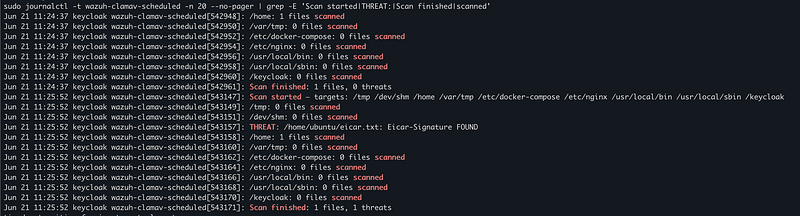
Wazuh Rules
xml
<rule id="101008" level="3">
  <program_name>wazuh-clamav-scheduled</program_name>
  <match>Scan started</match>
  <location>journald</location>
  <description>ClamAV scheduled scan started.</description>
  <group>clamav,audit,</group>
</rule>
config
<rule id="101009" level="3">
  <program_name>wazuh-clamav-scheduled</program_name>
  <match>Scan finished</match>
  <location>journald</location>
  <description>ClamAV scheduled scan summary.</description>
  <group>clamav,audit,</group>
</rule>
config
<rule id="101007" level="8">
  <program_name>wazuh-clamav-scheduled</program_name>
  <match>THREAT:</match>
  <location>journald</location>
  <description>ClamAV scheduled scan detected malware.</description>
  <group>clamav,malware,virus,</group>
</rule>
Evidence
bash
# View Wazuh alerts for scheduled scan rules (101007, 101008, 101009)
grep -E '"id":"(101007|101008|101009)"' /var/ossec/logs/alerts/alerts.json | tail -20
bash
# Count alerts by rule ID to verify all three rules are firing
for rule in 101007 101008 101009; do
  count=$(grep -c "\"id\":\"$rule\"" /var/ossec/logs/alerts/alerts.json)
  echo "Rule $rule: $count alerts"
done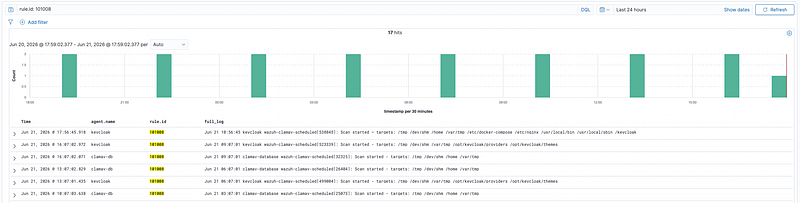
Custom Decoder
Two child decoders extract structured fields from the scheduled scan log (logged via logger -t wazuh-clamav-scheduled):
xml
<decoder name="clamav-scheduled">
  <program_name>wazuh-clamav-scheduled</program_name>
</decoder>
<decoder name="clamav-scheduled">
  <parent>clamav-scheduled</parent>
  <regex>Scan finished: (\d+) files, (\d+) threats</regex>
  <order>files_scanned,threats_found</order>
</decoder>
<decoder name="clamav-scheduled">
  <parent>clamav-scheduled</parent>
  <regex>THREAT: (\S+) (\S+) FOUND</regex>
  <order>threat_file,threat_signature</order>
</decoder>
Fields in dashboard: data.files_scanned, data.threats_found, data.threat_file, data.threat_signature.
End-to-End Test
bash
$ echo 'X5O!P%@AP[4\PZX54(P^)7CC)7}$EICAR-STANDARD-ANTIVIRUS-TEST-FILE!$H+H*' > /home/ubuntu/eicar.txt
$ bash /opt/wazuh/bin/wazuh-clamav-scheduled.sh
text
THREAT: /home/ubuntu/eicar.txt: Eicar-Signature FOUND
Scan finished: 1 files, 1 threats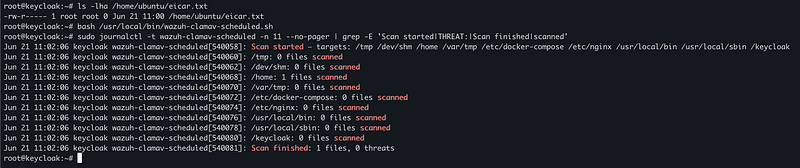
Wazuh alerts: 101008 (audit), 101007 (level 8), 101009 (summary).
Recommended dashboard query:
text
agent.name: keycloak AND (rule.id: 101007 OR rule.id: 101008 OR rule.id: 101009)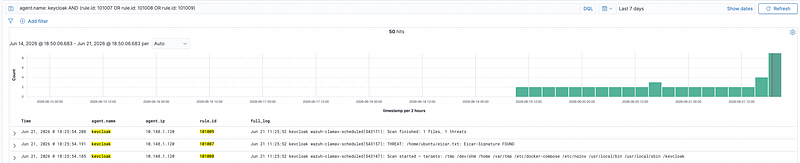
The Complete Pipeline
text
On-Access (realtime)     → 101001     fanotify kernel hook
Scheduled ClamAV (3h)    → 101007/8/9 clamdscan → clamd
YARA (6h)                → 102001/2/3 yara
Built-in (realtime)      → 52502      journald clamd stderr
bash
# Aggregated alert counts across all detection pipeline layers
echo "=== On-Access (rule 101001) ===" && grep -c '"id":"101001"' /var/ossec/logs/alerts/alerts.json
echo "=== Scheduled Start (rule 101008) ===" && grep -c '"id":"101008"' /var/ossec/logs/alerts/alerts.json
echo "=== Scheduled Threat (rule 101007) ===" && grep -c '"id":"101007"' /var/ossec/logs/alerts/alerts.json
echo "=== Scheduled Summary (rule 101009) ===" && grep -c '"id":"101009"' /var/ossec/logs/alerts/alerts.json
echo "=== YARA (rule 102001) ===" && grep -c '"id":"102001"' /var/ossec/logs/alerts/alerts.json
echo "=== Built-in clamd (rule 52502) ===" && grep -c '"id":"52502"' /var/ossec/logs/alerts/alerts.json
bash
# Extract decoded fields (files_scanned, threats_found) from alerts.json
grep -oP '"data":\{"files_scanned":"\K\d+|"threats_found":"\K\d+' \
  /var/ossec/logs/alerts/alerts.json | paste - - | sort -t$'\t' -k2 -nr | head -20
bash
# List decoded threat_file and threat_signature from recent alerts
grep -E '"id":"101007"' /var/ossec/logs/alerts/alerts.json \
  | grep -oP 'threat_file":"\K[^"]+|threat_signature":"\K[^"]+' \
  | paste - -
Deploy
bash
# Master playbook — deploys agent + ClamAV (on-access + scheduled) + YARA + network
ansible-playbook -i inventories/lab/hosts.ini playbooks/wazuh-agent.yml --limit keycloak,clamav_database

# Or individual plays:
ansible-playbook -i inventories/lab/hosts.ini playbooks/wazuh-clamav-scheduled.yml --limit keycloak,clamav_database
ansible-playbook -i inventories/lab/hosts.ini playbooks/wazuh-custom-rules.yml --limit aio
Detection Rules — Rationale

Why 101008/9 are level 3, not level 2: Wazuh Security Events defaults to level ≥ 3. Audit events must be visible in the default dashboard view, not hidden behind custom filters.
Operational Safety
Use a systemd timer or a cron wrapper with an exclusive lock (flock) so a slow scan cannot overlap the next run. Apply an overall timeout and emit a distinct failure event when it expires. Bound CPU, I/O, memory, open files, and scan scope with service controls; nice and ionice alone do not cap resource consumption.
Treat scanner exit codes explicitly: clean, malware found, and operational error are different outcomes. Never translate a timeout, unreadable path, clamd socket failure, or stale database into “0 threats.” The summary should record scanned, skipped, errored, and infected counts plus duration and signature age. Alert when a scheduled run is missing, not only when it reports malware.
Before scanning, reject or safely handle missing targets, unexpected mount points, symlink traversal, network filesystems, container layers, and files that change during inspection. The find pipeline should use null-delimited paths so whitespace and newlines cannot corrupt arguments. Decide whether files larger or older than the selected limits are covered by another control; exclusions are detection gaps, not performance details.
Check FreshClam success and database age before each run. Keep systemd journal retention or explicit log rotation sized for start, summary, error, and detection events without logging full sensitive file contents. File paths themselves may expose usernames, projects, or secrets, so restrict Wazuh access and retention accordingly.
On a detection, preserve hash and metadata, isolate or quarantine through an approved workflow, and allow restoration only after false-positive review. Test clean, EICAR, unreadable, oversized, missing-directory, stale-database, daemon-down, timeout, and overlapping-run fixtures before fleet rollout.
Next: Part 9 — Custom Malware Detection with YARA Scheduled Scanning