Real-Time Malware Blocking with ClamAV On-Access (Part 7)
How I set up ClamAV on-access scanning with clamonacc, clamd, AppArmor, and Wazuh, then narrowed the protection scope so it stays stable on real hosts.
Published · Republished on Medium

Files & Dependencies in this Post
text
files/clamav/onaccess/
├── default/
│   ├── clamd.base.conf              → Shared daemon baseline
│   ├── clamonacc.service            → systemd unit with --move quarantine
│   └── clamav-daemon.override.conf  → systemd drop-in
└── <host>/
    ├── clamd.base.conf              → Optional host-specific daemon override
    ├── clamd-onaccess.conf          → OnAccessIncludePath and exclusions
    └── usr.sbin.clamd               → AppArmor local profile
files/wazuh-agents/<host>/
└── ossec.conf                       → Collect ClamAV logs
files/wazuh/config/
├── rules/wazuh_custom_rules.xml     → Rules 101000-101009
└── decoders/local_decoder.xml       → ClamAV decoders

roles/
├── clamav_freshclam_client/
└── clamav_onaccess/

playbooks/
└── wazuh-clamav-onaccess.yml
Depends on: Part 6 (mirror) and Part 5 (rules).
The Current Design
Current model:
- on-access protection is focused on host paths that actually exist in the deployed workload
- scheduled scan covers broader temporary and configuration paths
- Wazuh still receives both layers as separate signals
For keycloak, the host is a Docker Compose node with Nginx reverse proxy, so the on-access paths are now:
bash
/home
/usr/local/bin
/usr/local/sbin
For clamav-db, the host is a FreshClam mirror plus Nginx static server, so the on-access paths are:
bash
/home
/usr/local/bin
/usr/local/sbin
That split is still intentional, but it is now based on the real host workload rather than old /opt/keycloak/* assumptions.
Architecture
text
Process access attempt
        │
        ▼
fanotify / clamonacc
        │
        ▼
clamd via local socket
        │
   ┌────┴────┐
   │         │
 CLEAN     FOUND
   │         │
 allow   block non-excluded user
         try move to /var/quarantine/clamav
         write detection log
         forward event to Wazuh
Two important qualifiers apply to the current repo state:
clamdruns asrooton the host-specific on-access profiles.OnAccessExcludeUname rootis used as a stability tradeoff.
That means the blocking behavior is aimed at non-root access, not malicious root itself.
Record the tested ClamAV package, kernel, distribution, and AppArmor policy versions with deployment evidence. ClamAV On-Access is Linux-only, requires fanotify (kernel 3.8 or later), and blocking requires CONFIG_FANOTIFY_ACCESS_PERMISSIONS=y; without it, detection may operate in notify-only mode.
Base Configuration
The shared daemon baseline now reflects the tuned runtime values used to reduce socket timeout noise:
bash
LocalSocket /var/run/clamav/clamd.ctl
ReadTimeout 300
CommandReadTimeout 300
SendBufTimeout 5000
MaxQueue 256
LogFile /var/log/clamav/clamav.log
LogFileUnlock true
Host-specific profiles can override the base entirely when needed. That is how keycloak and clamav-db both run clamd as root for the on-access layer.
Keycloak Profile
Current keycloak on-access overlay:
bash
# Repository-managed on-access overlay for the Keycloak host.
OnAccessPrevention yes
OnAccessMaxFileSize 100M
OnAccessExcludeUname root
OnAccessIncludePath /home
OnAccessIncludePath /usr/local/bin
OnAccessIncludePath /usr/local/sbin
OnAccessExcludePath /var/lib/docker
OnAccessExcludePath /var/lib/containerd
OnAccessExcludePath /var/lib/postgresql
OnAccessExcludePath /keycloak/postgres
OnAccessExcludePath /var/lib/clamav/tmp
OnAccessExcludePath /var/cache
OnAccessExcludePath /var/log
OnAccessExcludePath /var/ossec
OnAccessExcludePath /var/tmp
OnAccessExcludePath /home/ubuntu/.ssh
OnAccessExcludePath /home/ubuntu/.ansible
OnAccessExcludePath /home/ubuntu/.cache
OnAccessExcludePath /home/ubuntu/.config
OnAccessExcludePath /home/ubuntu/.local
OnAccessExcludePath /home/ubuntu/.npm
OnAccessExcludePath /home/ubuntu/.vim
OnAccessExcludePath /home/ubuntu/.vscode-server
OnAccessExcludePath /home/ubuntu/.terraform.d
OnAccessExcludePath /home/ubuntu/.kube
OnAccessExcludePath /home/ubuntu/.gnupg
OnAccessExcludePath /proc
OnAccessExcludePath /sys
OnAccessExcludePath /dev
OnAccessExcludePath /run
The reason folder is excluded is simple: it moved to the scheduled scanning layer in Part 8.
PostgreSQL data is bind-mounted from the host for Docker Compose, but it is not a good target for on-access malware scanning.
Quarantine Behavior
The repo service unit still uses:
ini
ExecStart=... clamonacc -F --config-file=/etc/clamav/clamd.conf \
  --log=/var/log/clamav/clamonacc.log \
  --move=/var/quarantine/clamav
That means this repo does not use the plain “block only” default behavior. It uses:
- on-access prevention
- plus a best-effort move to quarantine
If the move succeeds, the file is relocated to /var/quarantine/clamav. If it fails, you may still see a blocked access event without a clean quarantine move.
Quarantine is a security boundary: make it non-executable, inaccessible to normal users and web services, capacity-monitored, and covered by a retention policy. Store original path, hash, signature, owner, timestamp, and action result outside attacker-controlled fields. Restoration must require an approved false-positive decision and must not overwrite a newer file blindly.
AppArmor
The AppArmor local allowances are now aligned to the narrower design.
For keycloak, the meaningful read paths are:
bash
/home/** r,
/tmp/** r,
/dev/shm/** r,
/usr/local/bin/** r,
/usr/local/sbin/** r,
/var/quarantine/ r,
/var/quarantine/clamav/ rw,
/var/quarantine/clamav/** rwk,
The profile is now tied to the actual monitored host paths instead of stale container-internal assumptions.
AppArmor permission is separate from fanotify and filesystem permission. Test the loaded profile in enforcing mode and inspect denials; adding broad read permissions merely to silence denials expands what a compromised daemon can inspect. Because clamd runs as root here, a clamd vulnerability has a large blast radius. Prefer the least-privileged daemon identity that can read the selected paths, and document why any root requirement remains.
End-to-End Test
Use a path that is actually monitored by the current profile.
1. Deploy or re-apply the on-access profile
bash
ansible-playbook -i inventories/lab/hosts.ini \
  playbooks/wazuh-clamav-onaccess.yml --limit keycloak
2. Confirm services are healthy
bash
sudo systemctl status clamav-daemon clamonacc --no-pager
sudo ss -lnp | grep clamd.ctl
3. Create the EICAR test file and try to read it as a non-root user
bash
tee /home/ubuntu/eicar.txt >/dev/null <<'EOF'
X5O!P%@AP[4\PZX54(P^)7CC)7}$EICAR-STANDARD-ANTIVIRUS-TEST-FILE!$H+H*
EOF
Expected result:
bash
cat: /home/ubuntu/eicar.txt: Permission denied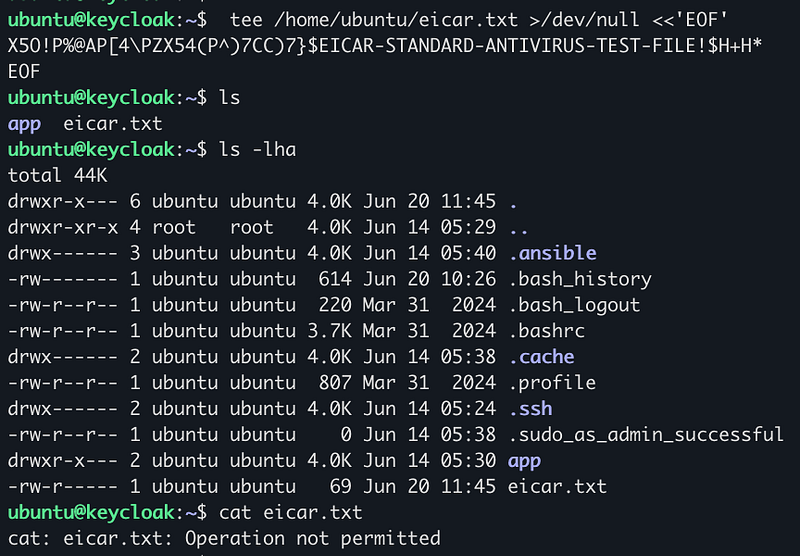
That demonstrates the EICAR fixture was blocked for this non-root path at that moment. It does not prove protection against unknown malware, root access, excluded paths, oversized files, races, archives beyond configured limits, or service failure.
4. Capture host-side evidence
bash
sudo tail -n 50 /var/log/clamav/clamav.log
sudo journalctl -u clamav-daemon -u clamonacc -n 50 --no-pager
sudo ls -la /var/quarantine/clamav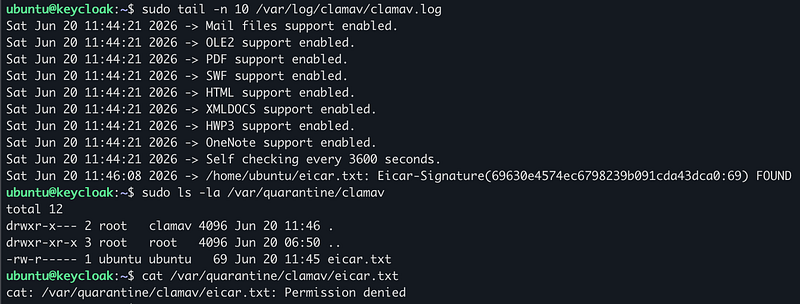
5. Capture Wazuh evidence
Recommended Wazuh query:
text
agent.name: keycloak AND rule.id: 101001For CLI validation on the manager:
bash
grep -E '"id":"101001"' /var/ossec/logs/alerts/alerts.json | tail -20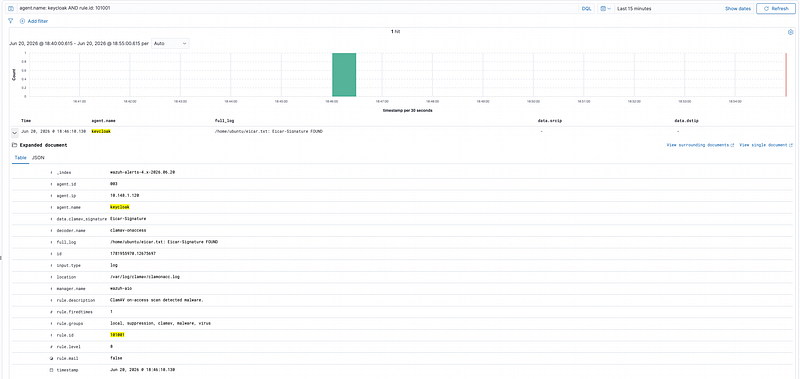
Deploy
bash
# Full stack
ansible-playbook -i inventories/lab/hosts.ini \
  playbooks/wazuh-agent.yml --limit keycloak,clamav_database
config
# On-access only
ansible-playbook -i inventories/lab/hosts.ini \
  playbooks/wazuh-clamav-onaccess.yml --limit keycloak
config
# Rules on manager
ansible-playbook -i inventories/lab/hosts.ini \
  playbooks/wazuh-custom-rules.yml --limit aio
Design Decision
I intentionally avoided making ClamAV On-Access scanning too aggressive across the whole system.
The reason is simple: the broader the real-time scanning scope, the higher the risk of false positives, performance issues, or service disruption. For this lab, I prefer a stable and realistic design over a configuration that looks strict but is difficult to operate.
That is why On-Access scanning is limited to important application paths, especially paths that are directly executed or modified.
For wider coverage, such as temporary directories and selected configuration paths, I rely on scheduled ClamAV scans. YARA is also part of the overall detection strategy for custom signatures, while Wazuh becomes the central place to collect evidence and security events.
However, this part focuses only on the On-Access design and behavior. Scheduled scans and custom YARA signatures will be covered in the next parts of the series.
So the model is not “block everything in real time.”
It is:
real-time protection where it matters, broader detection through scheduled scans, custom signatures with YARA, and centralized evidence in Wazuh.
Performance, Failure, and Rollback
ClamAV warns that prevention mode can seriously affect commonly accessed directories because file access waits for a verdict. Canary the policy and measure application latency, clamd queue depth, scan duration, CPU, memory, timeouts, and fanotify/inotify exhaustion. Do not increase MaxQueue or thread counts without capacity measurements; a larger queue can increase memory use and the time a process remains blocked.
Test both daemon-down and scanner-down behavior explicitly. Alert if clamd or clamonacc stops, loses its socket, enters notify-only mode, exhausts watches, cannot move a file, or loads stale signatures. Decide in advance whether each protected workload should fail open or fail closed; do not infer that behavior from an EICAR success test.
Roll out one host and one narrow path at a time. Keep the previous clamd.conf, systemd unit, and AppArmor policy. Rollback disables prevention or restores the previous include paths, reloads AppArmor, restarts the two ClamAV services, and verifies application access plus Wazuh alerting. Files already moved to quarantine require a separate reviewed recovery workflow.
Next: Part 8 — Scheduled Malware Scanning with ClamAV