Scheduled YARA Malware Detection with Wazuh (Part 9)
Build scheduled YARA malware scanning with Wazuh and Ansible to detect custom file signatures beyond traditional antivirus coverage.
Published · Republished on Medium

ClamAV is excellent at catching known malware. With 3.6 million signatures from Cisco Talos, it stops most threats before they execute.
But what about threats ClamAV doesn’t know about? A suspicious shell launcher in /usr/local/bin, a credential exfiltration script under /home, or a malicious helper dropped next to host configuration files.
Files in this Post
text
files/yara/
├── default/
│   ├── rules.yar                    → Generic baseline rules
│   ├── yara-scan.sh                 → Default scan script
│   └── wazuh-yara-scan.cron         → Default cron entry
└── <host>/
    ├── rules.yar                    → Custom YARA rules
    ├── yara-scan.sh                 → Scan script (logger to journald)
    └── wazuh-yara-scan.cron         → Every 6h at :15

roles/yara_scheduled_scan/           → Deploy rules + script + cron
playbooks/wazuh-yara-scan.yml

Depends on: Part 5 (rules 102001-102003)

files/wazuh/config/rules/
└── wazuh_custom_rules.xml           → Rules 102001/102002/102003 (Part 5)
This is where YARA comes in.
ClamAV catches what the world knows. YARA catches what only you know.
How YARA Works
YARA scans files for patterns you define — strings, byte sequences, regex. No signature database. No vendor updates. You write the rules.
bash
yara /etc/yara/wazuh-agent-rules.yar /path/to/file
  → Scans one candidate file at a time
  → Outputs: rule_name /path/to/file
A match means one of the loaded rules triggered. No match means only that this ruleset did not match within the scanner's limits; it does not mean the file is clean.
Rules: What to Look For
The key to effective YARA rules: think like an attacker targeting your environment.
Secret Exfiltration
If an attacker drops a helper script that harvests credentials and posts them out, you want to catch both the secret markers and the outbound action:
yara
rule Suspicious_Secrets_Exfiltration
{
  strings:
    $env1 = "AWS_SECRET_ACCESS_KEY" nocase
    $env2 = "GOOGLE_APPLICATION_CREDENTIALS" nocase
    $env3 = "Authorization: Bearer" nocase
    $env4 = ".env" nocase
    $exfil1 = "curl -X POST" nocase
    $exfil2 = "wget --post-file" nocase
  condition:
    2 of ($env*) and 1 of ($exfil*)
}
This is much more suitable for the current repo than assuming Keycloak theme PHP.
Encoded Command Launcher
Another useful host-level pattern is encoded command execution:
yara
rule Suspicious_Encoded_Command
{
  strings:
    $b64_1 = "base64 -d" nocase
    $b64_2 = "python -c" nocase
    $b64_3 = "bash -c" nocase
    $b64_4 = "eval $(echo" nocase
    $b64_5 = "openssl enc -base64 -d" nocase
  condition:
    2 of them
}
Reverse Shell (Anywhere)
The most common post-exploitation technique:
yara
rule Suspicious_Reverse_Shell
{
  strings:
    $nc      = "nc -e" nocase
    $devtcp  = "/dev/tcp/"
    $pythonr = "socket.socket" nocase
    $bashr   = "bash -i >&" nocase
    $perlr   = "Socket::INET" nocase
  condition:
    any of them
}
Any single match produces an alert in this policy. Some security tests, documentation, developer tooling, and incident-response scripts legitimately contain these strings, so context and false-positive tests remain necessary.
Dropper Detection
Malware that downloads and executes payloads:
yara
rule Suspicious_Dropper_Keywords
{
  strings:
    $curl   = "curl " nocase
    $wget   = "wget " nocase
    $chmod  = "chmod +x"
    $bash   = "/bin/bash"
    $python = "python -c" nocase
  condition:
    2 of them
}
curl alone is normal. curl + chmod +x is suspicious.
The Scan Script
Per-host, per-directory audit trail via logger:
The following is an abbreviated structure, not a runnable scanner: it builds target arguments but intentionally omits the null-delimited file iteration, YARA invocation, result parsing, counters, and error handling. Do not deploy it verbatim.
bash
#!/usr/bin/env bash
set -euo pipefail
RULES=/etc/yara/wazuh-agent-rules.yar
TAG=wazuh-yara-scan
logger -t "$TAG" "YARA scan started"
TARGETS=(
  "/tmp"
  "/dev/shm"
  "/home"
  "/var/tmp"
  "/etc/docker-compose"
  "/etc/nginx"
  "/usr/local/bin"
  "/usr/local/sbin"
  "/keycloak"
)
EXCLUDE_DIRS=(
  "/home/ubuntu/.ssh"
  "/home/ubuntu/.ansible"
  "/home/ubuntu/.cache"
  "/keycloak/postgres"
)
FILES=0
HITS=0
build_find_args() {
  local base="$1"
  local -n _out_ref="$2"
  _out_ref=("$base")
  _out_ref+=( -type f -print )
}
for dir in "${TARGETS[@]}"; do
  FIND_ARGS=()
  build_find_args "$dir" FIND_ARGS
done
logger -t "$TAG" "YARA scan finished: ${FILES} files, ${HITS} matches"
Uses logger to push directly to journald — collected by Wazuh agent, no file management needed.
A production implementation must use null-delimited paths, reject unexpected mounts and symlink traversal, cap file size and total work, apply a per-file and whole-run timeout, distinguish no-match from scanner error, and emit skipped/error counts. Use an exclusive lock so cron runs cannot overlap.
Wazuh Rules
Three rules matching on program_name=wazuh-yara-scan:
xml
<!-- Match detected — level 8 -->
<rule id="102001" level="8">
  <program_name>wazuh-yara-scan</program_name>
  <match>MATCH:</match>
  <location>journald</location>
  <description>YARA scan detected a rule match.</description>
  <group>yara,malware,</group>
</rule>

<!-- Audit: scan started — level 3 -->
<rule id="102002" level="3">
  <program_name>wazuh-yara-scan</program_name>
  <match>YARA scan started</match>
  <location>journald</location>
  <description>YARA scheduled scan started.</description>
  <group>yara,audit,</group>
</rule>

<!-- Audit: scan completed — level 3 -->
<rule id="102003" level="3">
  <program_name>wazuh-yara-scan</program_name>
  <match>YARA scan finished</match>
  <location>journald</location>
  <description>YARA scheduled scan completed.</description>
  <group>yara,audit,</group>
</rule>
Custom Decoder
Two child decoders pull structured fields from logger -t wazuh-yara-scan output:
xml
<decoder name="yara-scan">
  <program_name>wazuh-yara-scan</program_name>
</decoder>
<decoder name="yara-scan">
  <parent>yara-scan</parent>
  <regex>MATCH: (\S+) (\S+)</regex>
  <order>yara_rule,yara_file</order>
</decoder>
<decoder name="yara-scan">
  <parent>yara-scan</parent>
  <regex>YARA scan finished: (\d+) files, (\d+) matches</regex>
  <order>yara_files_scanned,yara_matches_found</order>
</decoder>
Fields in dashboard: data.yara_rule, data.yara_file, data.yara_files_scanned, data.yara_matches_found.
Cron Schedule
Staggered from ClamAV scheduled (:07) and freshclam:
cron
15 */6 * * * root /opt/wazuh/bin/wazuh-yara-scan.shRuns every 6 hours — less frequent than ClamAV scheduled because YARA targets host configuration and script paths that change less often.
YARA Rules — Rationale

Why **any of them** for reverse shells but **2 of them** for encoded launchers? False-positive risk calibration. A single python -c may be harmless, but /dev/tcp/ is much harder to justify in normal admin scripts.
End-to-End Test
bash
echo 'EICAR-STANDARD-ANTIVIRUS-TEST-FILE' > /home/ubuntu/test.txt
bash /opt/wazuh/bin/wazuh-yara-scan.sh
Result — journald:
text
wazuh-yara-scan: YARA scan started
wazuh-yara-scan: /tmp: 0 files, 0 matches
wazuh-yara-scan: /home: 11 files, 2matches
wazuh-yara-scan: /etc/docker-compose: 0files, 0 matches
wazuh-yara-scan: YARA scan finished: 11 files, 2 matches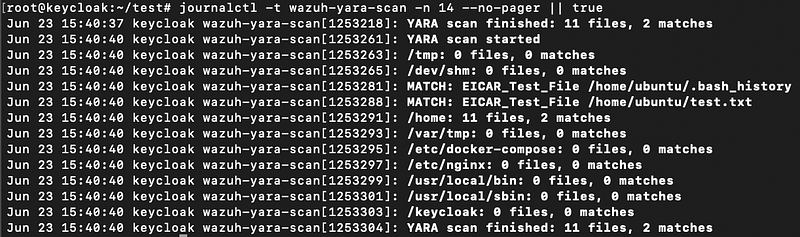
bash
# Run the YARA scan and view output in journald
bash /opt/wazuh/bin/wazuh-yara-scan.sh
journalctl -t wazuh-yara-scan --no-pager
Wazuh alerts:
Recommended dashboard query:
text
agent.name: keycloak AND (rule.id: 102001 OR rule.id: 102002 OR rule.id: 102003)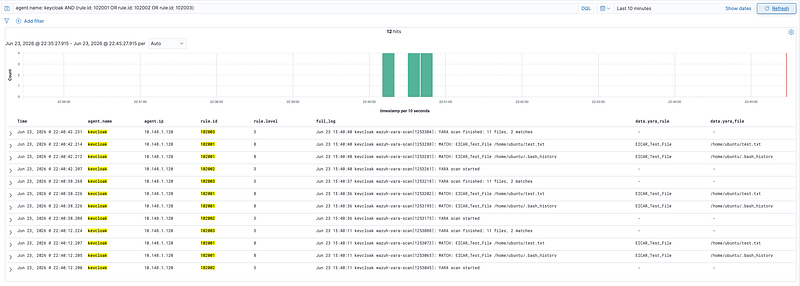
bash
# Inspect alerts directly on the Wazuh manager
grep -E '"id":"10200[123]"' /var/ossec/logs/alerts/alerts.json | tail -20
json
{"rule": {"id": "102002", "level": 3}, "description": "YARA scan started"}
{"rule": {"id": "102001", "level": 8}, "description": "MATCH: EICAR_Test_File test.txt"}
{"rule": {"id": "102001", "level": 8}, "description": "MATCH: EICAR_Test_File eicar.txt"}
{"rule": {"id": "102003", "level": 3}, "description": "YARA scan finished: 11 files, 2 matches"}
ClamAV vs YARA: When to Use Each
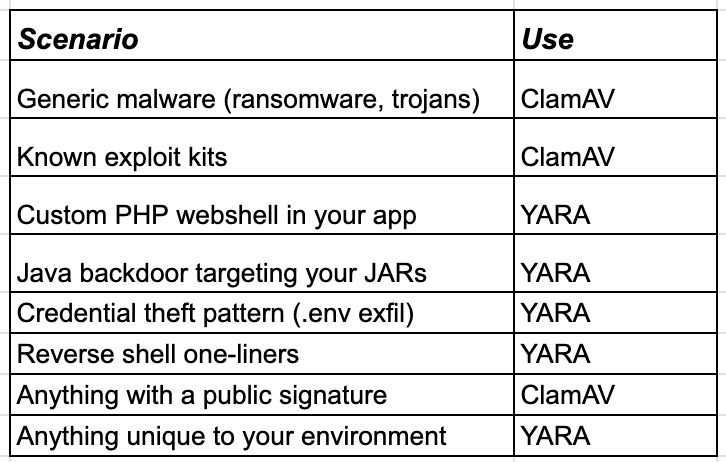
Deploy
bash
# Master playbook — deploys agent + YARA + ClamAV + network in one command
ansible-playbook -i inventories/lab/hosts.ini playbooks/wazuh-agent.yml --limit keycloak,clamav_database

# Or individual:
ansible-playbook -i inventories/lab/hosts.ini playbooks/wazuh-yara-scan.yml --limit keycloak,clamav_database
ansible-playbook -i inventories/lab/hosts.ini playbooks/wazuh-custom-rules.yml --limit aio
The Complete Detection Stack
text
On-Access (realtime)     → 101001     fanotify kernel hook
Scheduled ClamAV (3h)    → 101007/8/9 clamdscan → clamd
YARA (6h)                → 102001/2/3 yara custom rules on candidate files
Built-in (realtime)      → 52502      journald clamd stderr
Suppression (always)     → 100xxx     noise reduction
Four detection layers, all managed through Ansible. The small lab fixture produced no observed false positives during its measurement window; that is not a general false-positive rate or proof of detection coverage.
Rule Supply Chain and Test Corpus
Treat YARA files as executable detection logic. Record source, author, license, upstream URL, version or commit, review date, and cryptographic checksum. Review third-party rules before use: they may be incompatible with your data-handling policy, overly broad, expensive, or licensed in a way that prevents redistribution. Pin reviewed artifacts rather than downloading a mutable branch during deployment.
Compile-test the complete ruleset before promotion and maintain a corpus containing clean administrative scripts, application files, encoded-but-benign examples, EICAR-like fixtures, and approved malicious samples stored under the organization's malware-handling policy. Test expected matches, expected non-matches, timeout behavior, syntax errors, and resource ceilings. YARA heuristics have both false positives and false negatives; absence of a match is not proof that a file is safe.
Privacy and Response
Scanning /home, configuration directories, and scripts allows the scanner to read sensitive material. Run with the least privilege required, exclude private keys and regulated datasets unless explicitly approved, restrict rule modules that inspect process memory, and avoid sending matched strings or file contents to journald. Log a normalized path or opaque identifier, rule name, hash, size, owner, and timestamps according to retention policy.
A match should trigger triage, not arbitrary deletion or execution. Preserve evidence, confirm rule provenance and file hash, isolate the host or file through an approved response, and require review before quarantine restoration. Keep rollback simple: restore the previous pinned ruleset and scan wrapper, validate compilation, run the clean and positive fixtures, then resume scheduling.
Next: Part 10 — Automating Wazuh Indexer Backups to Google Cloud Storage