Monitoring AWS Egress Traffic with EC2 NAT and Suricata
Monitor AWS egress traffic by combining an EC2 NAT instance with Suricata for open-source network visibility and security analysis.
Published · Republished on Medium

A self-managed EC2 NAT instance creates a place where forwarded IPv4 egress can be observed. Adding Suricata can provide flow, DNS, HTTP, TLS, file, and alert events; putting it in NFQUEUE can also enforce tested drop rules.
This is not automatic “deep visibility.” Encrypted protocols conceal payloads, some modern TLS and QUIC traffic can reduce hostname visibility, packet loss creates blind spots, and the inspection host becomes part of the availability path. Treat the design as a controlled experiment or a deliberately engineered security service.
The NAT foundation is covered in Reduce AWS NAT Gateway Costs with an EC2 NAT Instance.
Architecture and packet path
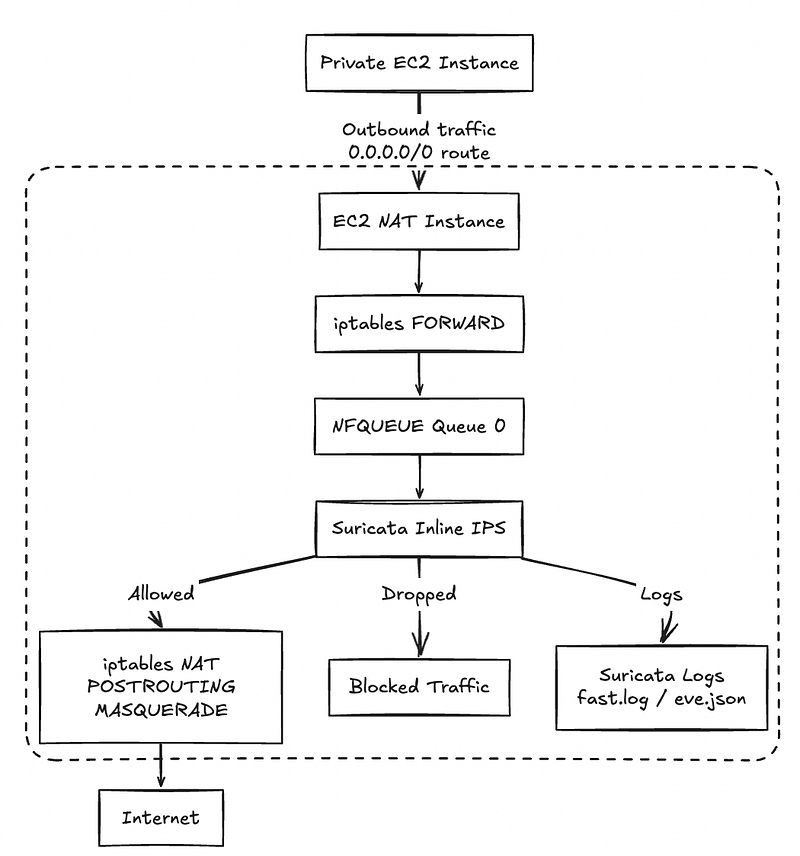
For this design, the path is:
text
private workload
  -> private route table
  -> EC2 NAT FORWARD chain
  -> NFQUEUE 0
  -> Suricata verdict
  -> iptables MASQUERADE
  -> internet gateway
Only traffic actually routed through this host is visible. Direct VPC endpoints, peering, Transit Gateway routes, IPv6 egress, other NAT devices, and direct public paths bypass it unless separately designed into the inspection architecture.
IDS versus IPS
- Passive IDS observes a copy of traffic. A Suricata failure normally does not interrupt forwarding, but alerts cannot directly block packets.
- Inline IPS puts Suricata in the forwarding decision. A
droprule can enforce a verdict, but queue or process failure can affect egress.
NFQUEUE does not turn every alert into a block. The rule action and IPS mode determine enforcement. Start with alert, measure false positives and performance, then promote narrowly scoped rules to drop.
Tested environment and version boundary
The original experiment used:
text
Operating system : Amazon Linux 2023
Architecture     : arm64 / AWS Graviton
Container image  : jasonish/suricata:8.0.4
Suricata mode    : NFQUEUE 0, inline IPS
Observed NIC     : ens5
Logs             : eve.json, fast.log, stats.log
Pin the tested container by digest in a deployment manifest. A tag alone can be republished. Scan the image, review the image publisher and build provenance, and test upgrades with captured or generated benign traffic before promotion.
Running a network engine in a container commonly requires host networking and capabilities such as NET_ADMIN. That is a privileged security boundary: restrict who can change the image, configuration, mounts, command, and Docker socket. Do not mount the Docker socket into Suricata.
Baseline NAT health first
Before adding inspection, verify forwarding from a private instance and record the baseline throughput, latency, CPU, ENA counters, and conntrack utilization:
bash
curl --fail --silent https://checkip.amazonaws.comThe response should match the intended NAT instance public IP. Keep a tested route rollback target because the next steps alter the live forwarding path.
Validate configuration before inline startup
Keep configuration, rules, and logs in separately controlled directories. The image version below matches the tested lab; substitute its reviewed digest in production-like use.
bash
sudo docker run --rm \
  --network host \
  --cap-add NET_ADMIN \
  -v /etc/suricata:/etc/suricata:ro \
  -v /var/log/suricata:/var/log/suricata \
  jasonish/suricata:8.0.4 \
  suricata -T --init-errors-fatal -c /etc/suricata/suricata.yaml
--init-errors-fatal is important because Suricata can otherwise warn about some initialization problems and continue. A clean test is necessary but not sufficient; also confirm the configured EVE event types, checksum/offload behavior, HOME_NET definition, rule paths, and NFQUEUE support in the actual image.
Start Suricata in NFQUEUE mode only after the configuration test passes:
bash
suricata -q 0 -c /etc/suricata/suricata.yaml --init-errors-fatalIf using Docker Compose, preserve the same queue, configuration, capability, network, and immutable-image settings. Add a health check that proves the engine is processing packets, not merely that the container process exists.
Insert the NFQUEUE rule safely
Scope the rule to the approved private CIDR and established return traffic rather than queueing unrelated forwarding indiscriminately:
bash
PRIVATE_CIDR='10.0.16.0/20'

sudo iptables -I FORWARD 1 \
  -s "$PRIVATE_CIDR" \
  -j NFQUEUE --queue-num 0 --queue-bypass

sudo iptables -I FORWARD 2 \
  -d "$PRIVATE_CIDR" \
  -m conntrack --ctstate ESTABLISHED,RELATED \
  -j NFQUEUE --queue-num 0 --queue-bypass
Inspect counters to prove packets reach the queue:
bash
sudo iptables -L FORWARD -n -v --line-numbersPersist rules only after functional and failure tests pass. Saving a broken rule set can turn a reboot into an outage.
--queue-bypass is an availability decision
With --queue-bypass, packets can pass when no userspace program is listening to the queue. This is fail-open behavior for that condition. It protects availability but creates an inspection gap. Without it, an unavailable queue listener can block forwarded traffic, which is fail-closed but can cause an egress outage.
Neither choice is universally correct. Document the policy, alert on the engine/queue state, and test process crash, container restart, invalid configuration, queue saturation, and host reboot. Do not describe queue-bypass as both guaranteed inspection and uninterrupted connectivity.
Manage rules as software
Suricata's official rule-management tool is suricata-update. Keep vendor rules and local policy separate:
yaml
default-rule-path: /var/lib/suricata/rules
rule-files:
  - suricata.rules
  - /etc/suricata/rules/local.rules
For every update:
- Pin or record the rule-source revision and license.
- Apply
enable.conf,disable.conf, threshold, and local overrides. - Run
suricata -T --init-errors-fatal. - Replay a benign regression corpus and expected alert/drop cases.
- Promote the new rules to
alertmode first where practical. - Reload or restart through a controlled procedure.
- Verify the active rule version and monitor memory during reload.
- Retain the previous bundle for rollback.
Rule reload builds a new detection engine before swapping it, so temporary memory use can increase. A valid rule file can still be operationally unsafe because of false positives or expensive matching.
Example HTTP and TLS hostname rules
Use a domain you own or a dedicated test hostname. Avoid testing blocking against unrelated third-party services.
text
alert http $HOME_NET any -> $EXTERNAL_NET any (msg:"TEST outbound HTTP host"; flow:established,to_server; http.host; content:"blocked.test.example"; nocase; endswith; sid:1000101; rev:1;)
alert tls $HOME_NET any -> $EXTERNAL_NET any (msg:"TEST outbound TLS SNI"; flow:established,to_server; tls.sni; content:"blocked.test.example"; nocase; endswith; sid:1000102; rev:1;)
Begin with alert. After confirming exact and subdomain matching, negative cases, false-positive behavior, and rollback, change only the approved signatures to drop.
Hostname suffix matching needs careful boundaries: a naive endswith match for example.com can also match an unrelated name such as notexample.com. Test the exact hostname and the dotted subdomain suffix explicitly.
What Suricata can observe
For unencrypted HTTP, enabled EVE loggers and rules can expose:
- Host, method, URL path, status, user agent, and other selected headers.
- File metadata and optionally file hashes/content inspected within configured limits.
- Flow and alert information.
For visible TLS handshakes, EVE can include selected metadata such as SNI, TLS version, certificate fields, ALPN, and JA3/JA4 when those features are enabled. This metadata does not reveal encrypted URL paths, request bodies, response bodies, credentials, or downloaded file contents.
Visibility is not guaranteed for every encrypted connection. Clients may omit SNI; encrypted ClientHello can conceal it; QUIC uses UDP and requires appropriate protocol support and policy; session resumption and parser/configuration choices affect emitted fields. DNS may also be encrypted or bypass the resolver path you expect.
For SSH, Suricata can observe flows and sometimes handshake/software metadata, but not terminal commands or transferred encrypted content.
Safe validation
Test in an isolated target you control:
- A permitted HTTP and HTTPS request still succeeds.
- The approved test hostname produces an alert.
- After promotion, only the intended hostname is dropped.
- Similar but non-matching hostnames remain allowed.
- Direct-IP, missing-SNI, HTTP/3/QUIC, and encrypted-DNS cases behave as documented.
- Stopping Suricata produces the chosen fail-open or fail-closed outcome.
- Restarting the container restores inspection and generates an alert.
- Sustained load does not create packet loss or queue backlog beyond the objective.
EICAR is safe for testing anti-malware controls, but an HTTPS EICAR download remains encrypted to a passive NAT-layer sensor. A rule that blocks secure.eicar.org by SNI proves hostname policy, not malware-content detection.
Query EVE without assuming every field exists
EVE records have different schemas by event type. Use optional defaults so a missing HTTP, TLS, file, or alert object does not break the query:
bash
sudo tail -F /var/log/suricata/eve.json | jq -c '
  select(.event_type == "http" or
         .event_type == "tls" or
         .event_type == "alert" or
         .event_type == "fileinfo" or
         .event_type == "flow") |
  {
    time: .timestamp,
    type: .event_type,
    src: .src_ip,
    src_port: .src_port,
    dst: .dest_ip,
    dst_port: .dest_port,
    app: .app_proto,
    host: (.http.hostname // null),
    url: (.http.url // null),
    sni: (.tls.sni // null),
    filename: (.fileinfo.filename // null),
    action: (.alert.action // null),
    signature: (.alert.signature // null)
  }'
These logs can contain internal IPs, domains, URLs, filenames, certificates, and potentially sensitive request metadata. Encrypt transport and storage, restrict access, redact where needed, define retention, rotate local files, and monitor forwarding backpressure. A full disk must not silently disable inspection or crash the NAT path.
Performance and blind-spot monitoring
Inspect stats.log, EVE statistics, NFQUEUE counters, Linux drops, CPU, memory, and ENA allowance metrics. Establish alerts for:
- Capture/kernel/decoder drops and invalid checksums.
- NFQUEUE backlog or userspace processing failure.
- Suricata restart, rule-load failure, and missing EVE events.
- High CPU, memory pressure, disk pressure, or log-forwarding backlog.
- EC2 bandwidth, PPS, and conntrack allowance exhaustion.
- A sudden fall to zero inspected traffic while NAT bytes remain nonzero.
Benchmark with the intended ruleset because rule count and complexity materially change throughput. Test both large flows and high connection rates; average Mbps alone misses packet-per-second and connection-tracking limits.
Response and rollback
For a false-positive drop:
- Identify the exact SID, flow, hostname/IP, and affected workload.
- Move the signature back to
alert, disable it narrowly, or restore the previous rule bundle. - Validate configuration and reload rules.
- Confirm application recovery and preserve evidence.
- Add a regression case before re-enabling enforcement.
For engine instability, restore the previous private route to a known-good NAT path if available. Changing to fail-open may restore connectivity but must trigger a high-priority inspection-gap alert.
Control boundary
This design can provide useful egress telemetry and selective network enforcement. It cannot establish PCI DSS, SOC 2, or NIST compliance on its own, and it does not replace endpoint protection, workload identity, DNS governance, secure web gateways, application controls, or a managed firewall where those are required.
Document which subnets, IP versions, routes, protocols, applications, and encryption cases are actually covered. Evidence-qualified scope is more valuable than describing the NAT instance as a universal egress firewall.
Further reading
- Suricata 8.0.4 EVE JSON output
- Suricata IPS mode and NFQUEUE
- Suricata rule management
- Suricata rule reloads
- AWS ENA network performance metrics
Final thoughts
Suricata on an EC2 NAT instance is most useful when its packet path, encryption limits, failure policy, and performance are explicit. Start in alert mode, prove the telemetry, test the queue failure behavior, measure packet loss under representative load, and promote only narrow, regression-tested rules to blocking.