Build a Centralized DAST Pipeline with ZAP, Nuclei, and GitHub Actions
Build a reusable DAST pipeline with OWASP ZAP, Nuclei, OPA policy decisions, GitHub Actions, pull-request feedback, and audit-ready reports.
Published · Republished on Medium

If you’ve worked on more than one application repo, you know the pain.
Every new service spins up. Someone says, “We should add DAST.” Suddenly you’re copy-pasting YAML from another repo. Installing OWASP ZAP again. Downloading Nuclei again. Tweaking configs again. Debating thresholds again.
Six months later, you’re maintaining five slightly different DAST pipelines that all behave differently—and no one remembers why.
I hit that wall hard. And that’s exactly why I built riowiraldhani/security-dast.
DAST sends real HTTP requests and can change application state. Run it only against systems you own or are explicitly authorized to test. A centralized pipeline must enforce that boundary instead of trusting an arbitrary URL supplied by a caller.
The idea: one DAST hub, many apps
Instead of every repo owning its own scanners and logic, security-dast is a centralized DAST hub.
It keeps all the heavy stuff in one place:
- OWASP ZAP invocation
- Nuclei scanning
- Open Policy Agent (OPA) policy logic
- Tuning helpers, regression checks, and reporting
Application repositories don’t install scanners. They don’t parse JSON. They don’t argue about PASS vs WARN.
They just call a reusable workflow.
yaml
name: Centralized DAST Scan

on:
  workflow_call:
    inputs:
      app_name:
        required: true
        type: string
        description: 'Application name for identification'
      target_profile:
        required: true
        type: string
        description: 'Approved target identifier; resolved by the central workflow'
      scan_timeout:
        required: false
        type: number
        default: 600
        description: 'Scan timeout in seconds'
      nuclei_version:
        required: false
        type: string
        default: '3.7.0'
        description: 'ProjectDiscovery Nuclei release version'
      nuclei_severity:
        required: false
        type: string
        default: 'critical,high,medium'
        description: 'Comma-delimited severity levels passed to Nuclei'
      policy_dir:
        required: false
        type: string
        default: 'policies'
        description: 'Path to the OPA policy directory'
      opa_version:
        required: false
        type: string
        default: '1.8.0'
        description: 'Pinned OPA release validated by the platform team'
    outputs:
      scan_status:
        description: 'Overall scan status (PASS/WARN/FAIL)'
        value: ${{ jobs.evaluate.outputs.status }}
jobs:
  zap-scan:
    name: OWASP ZAP Baseline Scan
  nuclei-scan:
    name: Nuclei Vulnerability Scan
  evaluate:
    name: Risk Evaluation
    needs: [zap-scan, nuclei-scan]
This is an interface sketch, not the entire security boundary. The production workflow should accept an approved target identifier and resolve its URL from protected configuration. If a URL must remain an input, parse it as a URL, require HTTPS, compare the normalized hostname and port against an allowlist, resolve DNS, and reject loopback, link-local, metadata-service, private, or newly resolved addresses unless that network is an explicitly authorized test environment. Revalidate after redirects to limit SSRF and DNS-rebinding paths.
Pin the reusable workflow itself to a reviewed commit SHA in each caller:
yaml
name: Authorized DAST

on:
  workflow_dispatch:

permissions:
  contents: read
  id-token: write

jobs:
  scan:
    uses: riowiraldhani/security-dast/.github/workflows/reusable-dast.yml@0123456789abcdef0123456789abcdef01234567
    with:
      app_name: customer-portal
      target_profile: customer-portal-staging
      scan_timeout: 600
A branch or mutable tag makes every caller change behavior when the central repository moves. A commit SHA makes a run reproducible and lets teams upgrade through an auditable pull request. Pin third-party actions and scanner container images by immutable reference as well, then use an automated dependency-update process to propose upgrades.
What lives inside security-dast
At its core, the repo bundles two scanners and a decision engine:
- ZAP baseline scan for dynamic web issues
- Nuclei for template-based vulnerability detection
- OPA to turn raw findings into a clear PASS / WARN / FAIL verdict
Around that, there are helper scripts that solve the annoying real-world problems:
- Risk evaluation:
risk-evaluator.pyfeeds findings into OPA and produces a risk score, severity counts, violations, and recommendations. - Regression guard: compares today’s risk score with the previous run stored in object storage and fails the job if risk jumps unexpectedly.
- Tuning guidance: highlights the most frequent violations so teams can tune ZAP rules, Nuclei templates, or policy thresholds instead of ignoring alerts.
- Policy health checks: ensures policy changes don’t silently flip outcomes.
config
tree scripts/
├── nuclei-scan.sh
├── opa_utils.py
├── policy-health.py
├── regression-guard.py
├── report-generator.py
├── risk-evaluator.py
├── tuning-helper.py
├── validate-config.sh
└── zap-baseline.sh

tree policies/
├── canonical-input.json
└── severity-rules.rego
All of this is orchestrated by a single reusable workflow:
.github/workflows/reusable-dast.yml.
Reproducibility also includes the Nuclei template set, ZAP rules/configuration, OPA policies, and normalization code. Record their versions or Git SHAs in every report. Do not update Nuclei templates implicitly during a scan; promote a tested template snapshot as a separate change.
Guardrails before any request is sent
A central scanner has network reach and credentials, so validate these controls before execution:
- The caller repository and workflow identity are approved.
- The target is registered, owned, and mapped to an allowed environment.
- Production scans require a protected GitHub Environment and reviewer approval.
- The runner can reach only the target, required package sources, and evidence storage.
- Concurrency, requests per second, request timeout, scan duration, and maximum redirect count are bounded.
- Destructive templates and active scan rules are excluded unless separately approved.
- Test accounts and seed data are disposable, least-privilege, and clearly identifiable.
Nuclei supports global request-rate and concurrency controls. ZAP Baseline is primarily a time-limited spider plus passive scan; it is not equivalent to an authenticated active scan. Pick the scan mode deliberately and label the result accurately.
How a scan actually runs
When a pull request triggers the workflow, here’s what happens:
- The workflow authorizes and resolves the registered target, then records the effective URL and IP addresses.
- ZAP runs in the approved mode and produces machine-readable plus human-readable reports.
- Nuclei runs with pinned templates, explicit severity filters, exclusions, rate limits, and concurrency limits.
- OPA evaluates normalized findings using the pinned
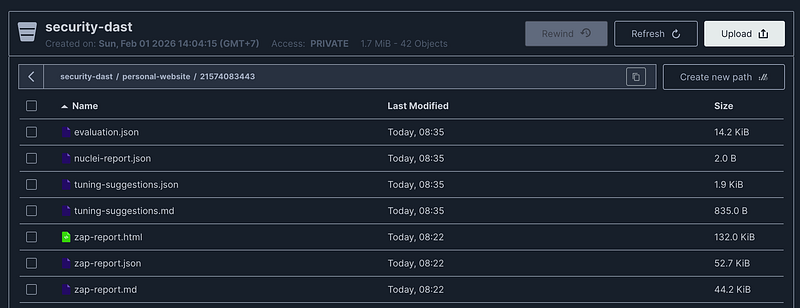
severity-rules.regopolicy. - Artifacts are uploaded to object storage (S3 or MinIO) under a predictable path:
<bucket-name>/<app_name>/<run_id>/ - This includes raw reports, tool logs, the target manifest, versions, evaluation results, and tuning suggestions.
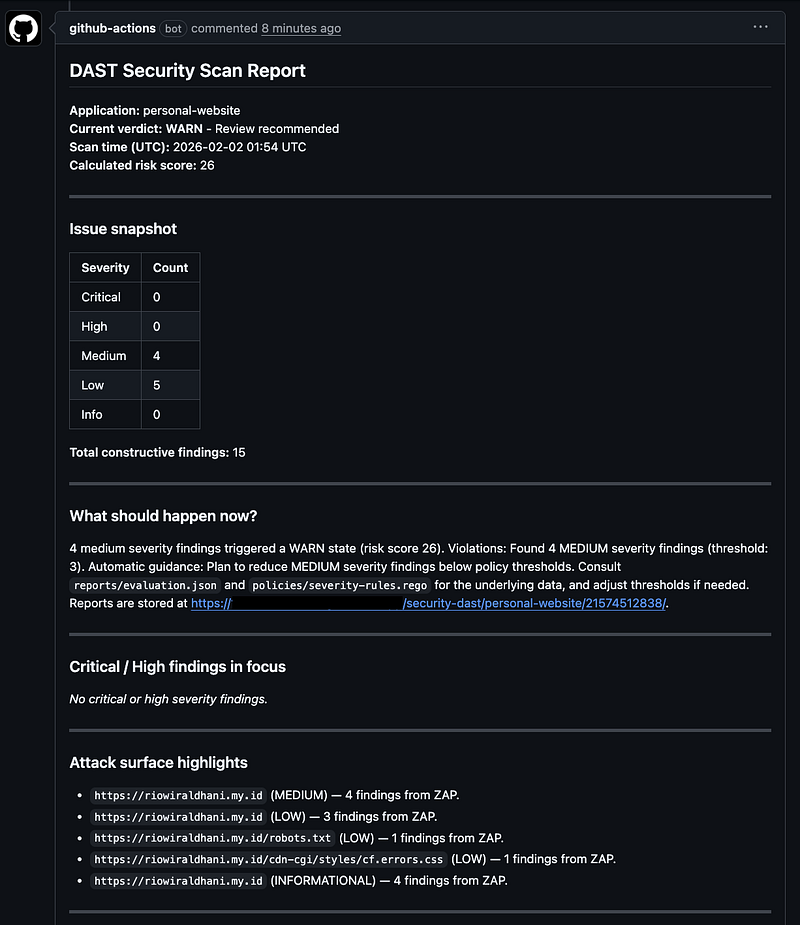
- A policy-driven PR comment is posted with:
- Final verdict (PASS/WARN/FAIL)
- Risk score and severity breakdown
- What should happen next
- Direct download links to the stored artifacts
No digging through GitHub Actions logs. No guessing which report matters.
This becomes auditable and repeatable only when artifacts are immutable, access-controlled, retained by policy, and tied to the caller SHA, workflow SHA, target identity, scanner versions, template/policy SHAs, timestamps, and run attempt.
The best part: app repos stay clean
Take my website repo, riowiraldhani.my.id.
It doesn’t vendor scanners. It doesn’t contain ZAP configs. It doesn’t know anything about OPA rules.
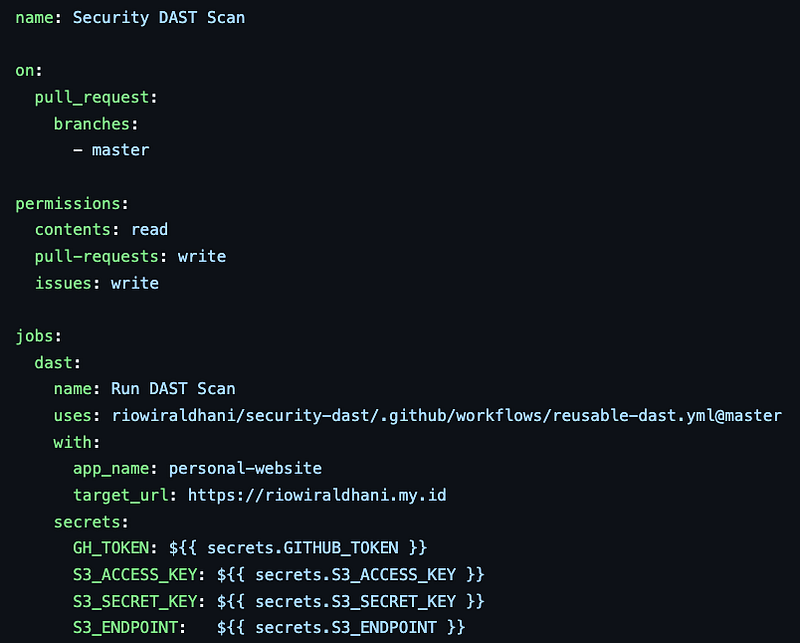
Its entire DAST setup is just a workflow call:
app_name- an approved
target_profile - the minimum permissions needed by the selected scan mode
That’s it.
If I improve policies, tweak tuning, or add safeguards, each repo can adopt the reviewed workflow SHA without duplicating the implementation.
Why this works better in real teams
This model solves problems I kept seeing in real engineering orgs:
- Consistency: every app is judged by the same policy logic.
- Less copy-paste: one repo owns scanners, configs, and decisions.
- Faster reviews: PR comments tell engineers exactly what to fix.
- Audit-friendly: artifacts live in structured storage, not ephemeral CI logs.
- Safer changes: regression guards prevent “security drift” over time.
DAST stops being a fragile afterthought and becomes shared infrastructure. That also increases blast radius: a broken central policy or compromised workflow can affect every caller. Protect the central repository with CODEOWNERS, branch protection, required reviews, signed or attested artifacts where available, and isolated release promotion.
Authentication and secret handling
Prefer GitHub OIDC and a short-lived cloud role over long-lived S3 access keys. Constrain the cloud trust policy with repository and reusable-workflow claims, and grant access only to the evidence prefix needed by that run. Set GITHUB_TOKEN permissions to read-only by default and add pull-requests: write only to the job that posts a comment.
Authenticated scans need a dedicated low-privilege test identity. Keep session material out of command arguments, reports, debug logs, and PR comments. Masking is not a guarantee after secrets are transformed, so redact reports before upload and make raw evidence available only to authorized responders.
Do not pass all caller secrets with secrets: inherit. Declare only the secrets a scan mode needs, and do not expose protected secrets to untrusted fork pull requests.
Define scanner failure separately from findings
The workflow needs two independent outcomes:
- Execution status: scanners ran successfully, reached the intended target, authenticated when required, parsed reports, evaluated policy, and stored evidence.
- Security verdict: the successfully collected findings produced
PASS,WARN, orFAILunder a named policy version.
A timeout, DNS failure, authentication failure, empty report, parser error, missing template set, policy error, or upload failure must never become PASS. Mark the run as an infrastructure/error state and fail closed for release gates unless an approved exception says otherwise.
Keep warning and failure thresholds in versioned policy, but preserve raw severities and scanner confidence. A policy verdict does not prove the absence of vulnerabilities; it only states how the observed findings were handled.
Exceptions and evidence retention
False positives and accepted risks need structured exceptions with finding fingerprint, target scope, owner, reason, approval, creation date, and expiry. Expired exceptions should fail evaluation until reviewed. Never suppress by broad rule ID when a narrower fingerprint is possible.
Store an evidence manifest alongside reports containing hashes for every artifact. Enable encryption, least-privilege access, retention or Object Lock when required, and lifecycle deletion aligned with data classification. Avoid public pre-signed links in PR comments; use short-lived access issued after authorization.
Validation before rollout
Test the central workflow against deliberately vulnerable, isolated applications and safe negative controls. Cover:
- unauthorized host, redirect, DNS-rebinding, and cloud metadata attempts;
- tool timeout, non-zero exit, corrupt or empty output, and policy parse failure;
- anonymous and authenticated coverage;
- rate limits and application stability under scan;
- expected true positives, false-positive exceptions, and expiry;
- evidence upload failure and PR-comment sanitization;
- upgrade regression for scanner, templates, policies, and parsers.
When you should adopt this
If your team:
- Maintains more than one repo
- Wants DAST results engineers can actually act on
- Cares about consistency, auditability, and low maintenance
Then a shared workflow like this is the right abstraction.
Stop rebuilding DAST pipelines per repo. Build them once — and reuse them everywhere.