Manage Wazuh Agent Profiles with Ansible (Part 4)
How I managed different Wazuh agent ossec.conf profiles using inventory-owned files, host variables, and Ansible deployment roles.
Published · Republished on Medium

This article continues from Part 3: Managing Wazuh Manager Configuration with Ansible, where I covered how I managed Wazuh manager ossec.conf using inventory-owned files and a controlled Ansible deployment flow.
In this part, I will focus on Wazuh agent configuration.
After the Wazuh manager is running, the next thing I want to control is how agents are configured across different types of hosts.
Not every server should always use the same agent configuration.
For example, a default Linux server and a Keycloak server may need different log collection paths, local files, or monitoring rules.
That is why I manage Wazuh agent configuration using profiles.
Version note: these examples target Linux agents in the Wazuh 4.14 release family. Windows uses
C:\Program Files (x86)\ossec-agent\ossec.conf, different service and event-channel semantics, and should have separately tested profiles rather than receiving a Linux file.
Why Agent Profiles?
A Wazuh agent configuration usually lives on the target host at:
bash
/var/ossec/etc/ossec.confFor a small lab, using one default agent config may be enough.
But as the environment grows, different servers may need different monitoring behavior.
Examples:
text
default Linux server
  -> basic system logs and auth logs
config
Keycloak server
  -> system logs, container logs, Keycloak logs
config
Nginx server
  -> access logs, error logs, reverse proxy logs
config
database server
  -> database logs and audit-related files
If all agents use the same ossec.conf, the config can quickly become too generic or too noisy.
Using agent profiles makes the configuration cleaner.
Each host gets the agent config that matches its role.
Repository Layout
The agent configuration files are stored under the inventory-owned files directory:
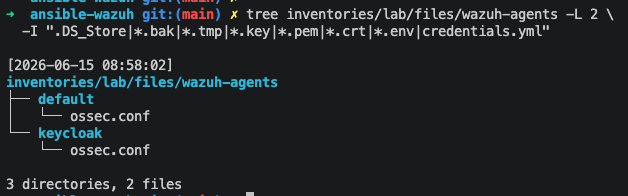
The idea is simple:
text
wazuh-agents/default/ossec.conf
  -> default agent profile
config
wazuh-agents/keycloak/ossec.conf
  -> Keycloak-specific agent profile
This keeps agent configuration separate from manager configuration.
Manager config lives here:
bash
inventories/lab/files/wazuh/config/manager/ossec.confAgent config lives here:
bash
inventories/lab/files/wazuh-agents/<profile>/ossec.confThis separation is important because manager and agent configuration have different ownership and different deployment targets.
Inventory Mapping
Each host can define which agent profile it should use.
Example inventory:

With this approach, the deployment role does not need hardcoded host logic.
It only reads the variable:
yaml
wazuh_agent_profileThen it selects the matching file from:
bash
inventories/lab/files/wazuh-agents/<profile>/ossec.confThis makes the pattern reusable.
If later I need an Nginx agent profile, I can add:
bash
inventories/lab/files/wazuh-agents/nginx/ossec.confThen map the host explicitly:
ini
nginx-01 ansible_host=10.0.10.21 wazuh_agent_profile=nginxNo role logic needs to change.
Ansible Role Flow
I use a local role to manage agent configuration.
Example role name:
bash
roles/wazuh_agent_deployThe role flow is:
text
1. Read wazuh_agent_profile from host variables
2. Fail if an explicitly requested profile is missing
3. Copy ossec.conf to the target agent host
4. Set correct owner and permissions
5. Validate the installed configuration
6. Restart wazuh-agent only when config changes
7. Verify connectivity and expected log ingestion
The playbook can stay simple:
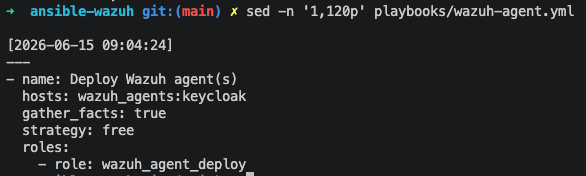
The playbook defines the target group and role.
The profile selection logic stays inside the role.
Copying Agent ossec.conf
For agent configuration, I use a deliberately constrained fallback mechanism with Ansible first_found.
An explicit wazuh_agent_profile is a contract: if that profile is absent, deployment must fail. Silently falling back from a requested keycloak profile to default can remove security telemetry without anyone noticing. I allow default only when the variable is intentionally unset.
The lookup order is:
bash
1. explicitly selected profile, if set (missing means failure)
2. inventory hostname override, if this behavior is documented
3. default profile, only when no explicit profile was requested
In the role, the behavior is defined in:
bash
roles/wazuh_agent_deploy/tasks/main.ymlConceptually, the source selection works like this:
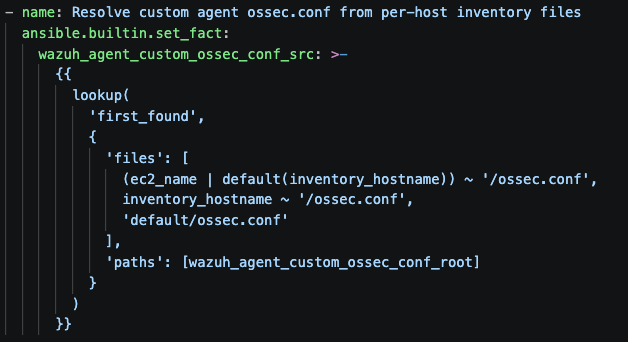
Then the selected file is copied to the agent runtime path:
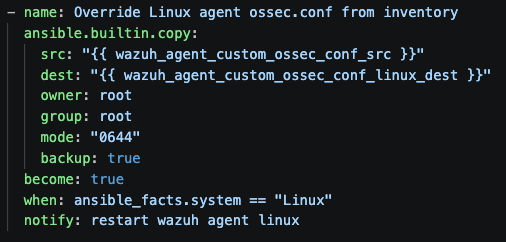
This gives a flexible configuration model.
For example, if the host has:
The role will first look for:
bash
inventories/lab/files/wazuh-agents/keycloak/ossec.confIf no explicit profile was selected, a documented hostname override may be considered:
bash
inventories/lab/files/wazuh-agents/keycloak-01/ossec.confIf that also does not exist, it will use:
bash
inventories/lab/files/wazuh-agents/default/ossec.confThis is useful because most agents can use an approved default configuration, while specific hosts can override it when needed. Log the selected profile and its checksum in the deployment output so a reviewer can see what each endpoint received.
The pattern becomes:
text
host-specific config
  -> inventory hostname config
  -> default config
So I do not need to create a custom config for every agent.
I only create a dedicated folder when a host needs different monitoring behavior.
Restart Handler
The agent should restart only when the configuration changes.
Handler example:
yaml
- name: restart wazuh-agent
  ansible.builtin.systemd:
    name: wazuh-agent
    state: restarted
    enabled: true
This keeps the playbook idempotent.
If the selected ossec.conf is already applied, Ansible does not restart the agent again.
Verifying the Agent
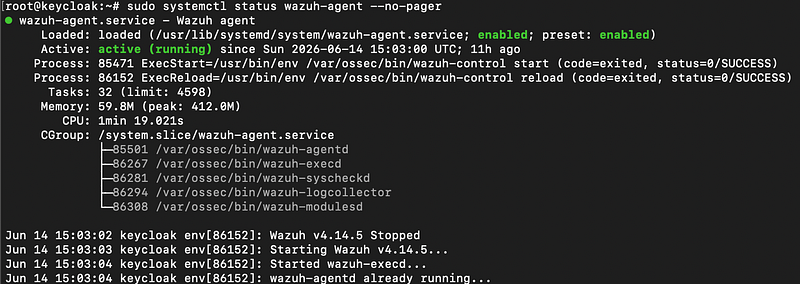
After applying the config, I usually verify the service on the agent host:
Or check recent logs:
bash
journalctl -u wazuh-agent -n 100 --no-pagerFrom the Wazuh manager side, I can also verify the agent list:
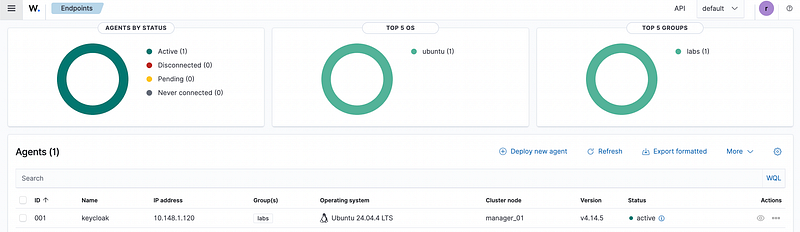
The expected result is that the agent is connected and active, but that alone does not prove the profile works. Validate the runtime configuration with the relevant installed tools (including wazuh-agentd -t and wazuh-logcollector -t), generate a harmless test log for each new collector, and verify the expected event or alert reaches the manager.
This confirms that the configuration was applied without breaking the agent connection to the manager.
Example: Default vs Keycloak Profile
A default profile may only collect standard Linux logs:
xml
<localfile>
  <log_format>syslog</log_format>
  <location>/var/log/auth.log</location>
</localfile>
<localfile>
  <log_format>syslog</log_format>
  <location>/var/log/syslog</location>
</localfile>
A Keycloak profile may include additional logs:
xml
  <localfile>
    <log_format>syslog</log_format>
    <location>/var/log/auth.log</location>
  </localfile>

  <localfile>
    <log_format>syslog</log_format>
    <location>/var/log/syslog</location>
  </localfile>

  <localfile>
    <log_format>syslog</log_format>
    <location>/var/log/kern.log</location>
  </localfile>

  <localfile>
    <log_format>syslog</log_format>
    <location>/var/log/ufw.log</location>
  </localfile>

  <localfile>
    <log_format>syslog</log_format>
    <location>/var/log/cloud-init.log</location>
  </localfile>

  <localfile>
    <log_format>syslog</log_format>
    <location>/var/log/cloud-init-output.log</location>
  </localfile>

  <localfile>
    <log_format>syslog</log_format>
    <location>/var/log/dpkg.log</location>
  </localfile>

  <localfile>
    <log_format>journald</log_format>
    <location>journald</location>
  </localfile>
For journald, both values must be journald; the removed duplicate block incorrectly paired location=journald with log_format=syslog. Avoid collecting both broad journald input and the same flat log files unless duplicate ingestion has been evaluated. Prefer journald filters such as _SYSTEMD_UNIT when the full journal would create unnecessary volume.
The exact log paths depend on how Keycloak is deployed.
The important part is not the specific path.
The important part is the pattern:
text
different host role
  -> different agent profile
  -> different ossec.conf
This keeps the agent configuration easier to reason about.
What This Enables
Using agent profiles makes future changes easier.
For example, I can add more profiles later:
text
wazuh-agents/
├── default
├── keycloak
├── nginx
├── postgres
└── docker-host
Each profile can have its own ossec.conf.
Inventory decides which host gets which profile.
The role only handles deployment.
This keeps the responsibilities clear:
text
inventory
  -> selects the profile
config
files directory
  -> stores the profile config
config
role
  -> deploys the selected config
config
playbook
  -> runs the flow
That separation makes the setup easier to extend without adding too much complexity.
Managing Wazuh agent configuration with Ansible makes agent behavior more predictable.
Instead of using one generic ossec.conf for every host, each server can use a profile that matches its role.
The key pattern is simple:
text
host variable
  -> selects agent profile
config
inventory file
  -> stores ossec.conf
config
Ansible role
  -> deploys the selected config
This keeps agent configuration clean, reusable, and easier to review.
Local and Centralized Configuration Precedence
This article deploys local ossec.conf files, but Wazuh can also distribute agent.conf from manager-side agent groups. When both are used, Wazuh reads local ossec.conf first and then merges shared agent.conf; later shared settings can override scalar values, while some repeated paths are combined. Agents in multiple groups receive merged group content with an explicit priority order.
Choose an ownership model before deployment. If Ansible owns a setting locally, do not unknowingly override it from a shared group. For centralized configuration, stage agent.conf.tmp, validate it with verify-agent-conf, then rename it into place and confirm group_config_status=Synced through the server API or agent_groups.
Staged Rollout and Recovery
Deploy a new or changed profile to one canary endpoint first. Check daemon tests, manager connectivity, expected telemetry, CPU, memory, queue behavior, and duplicate-event volume before expanding the batch. Limit Ansible concurrency so a bad profile cannot disconnect an entire fleet simultaneously.
Keep the previous profile artifact and checksum. If validation, connectivity, or telemetry fails, restore it, restart only affected local agents, and verify recovery from the manager. A default profile is not an acceptable rollback for a host that requires specialized security collection.
In the next part, I will cover custom Wazuh suppression rules, including how to keep custom rules separate from upstream-managed files and deploy them safely with Ansible.