Deploy Wazuh with Ansible (Part 1)
A practical guide to building a maintainable Wazuh deployment repository using upstream roles, wrapper roles, and inventory-driven files.
Published · Republished on Medium

I wanted to build a Wazuh deployment that was easy to repeat, easy to debug, and easy to extend.
Installing Wazuh manually is fine for one server. But once the setup starts to include multiple components, custom configuration, certificates, agents, SAML, reverse proxy, and future upgrade flows, manual steps become difficult to maintain.
That is why I decided to build the deployment around Ansible.
The goal was not only to install Wazuh. The goal was to create a repository structure that I could still understand and safely modify later.
This first part focuses only on the foundation: how I structured the Ansible repository, why I still use the upstream wazuh-ansible roles, how inventory files are organized, and how the All-in-One deployment flow works.
Version note: the examples were reviewed against the official
wazuh-ansibletagv4.14.6. Pin the Wazuh packages, roles, and documentation to the same release family, then test upgrades in a non-production environment. Do not copymaininto a production deployment and assume it remains compatible.
Why Ansible?
Wazuh has several moving parts:
- Wazuh indexer
- Wazuh manager
- Wazuh dashboard
- Filebeat
- certificates
- configuration files
- agent enrollment
For a lab, it is possible to install everything manually. But manual installation has one big problem: it is hard to reproduce.
With Ansible, the deployment becomes more predictable.
I can define the target hosts, variables, files, roles, and execution order in one repository. If something breaks, I can inspect the playbook and role flow instead of relying on command history.
For me, Ansible is useful here because it gives a clear operational model:
text
inventory  -> where to deploy
files      -> environment-owned, non-secret inputs
roles      -> how to deploy
playbooks  -> when to deploy
That separation is important when the repository starts to grow.
Why Still Use Upstream wazuh-ansible?
Instead of rewriting the Wazuh installation logic from scratch, I use the official upstream Ansible content as a pinned dependency:
bash
git clone --branch v4.14.6 --depth 1 \
  https://github.com/wazuh/wazuh-ansible.git roles/wazuh-ansible
For a maintained repository, a Git submodule, subtree, or dependency manifest is preferable to an undocumented local clone. Record the exact tag and commit SHA in the lock or deployment evidence. A tag is convenient for humans; a reviewed commit identifies the exact code that ran.
The reason is simple: Wazuh installation has many internal details, and upstream roles already handle most of the base installation logic.
But I also did not want my repository to depend completely on the upstream repository layout.
My repository manages environment-specific inventory, custom manager and agent configuration, suppression rules, SAML integration, certificate references, and reverse-proxy configuration around that dependency.
So the upstream roles are used as the installation engine, while my repository provides the structure and orchestration around them.
The pattern looks like this:
text
Local repository
└── local wrapper roles
    └── upstream wazuh-ansible roles
This gives me a good balance.
I can keep using upstream Wazuh automation, but still control how my own repository is structured.
Repository Structure
The repository is structured around playbooks, inventories, local roles, and upstream roles.
A simplified version looks like this:
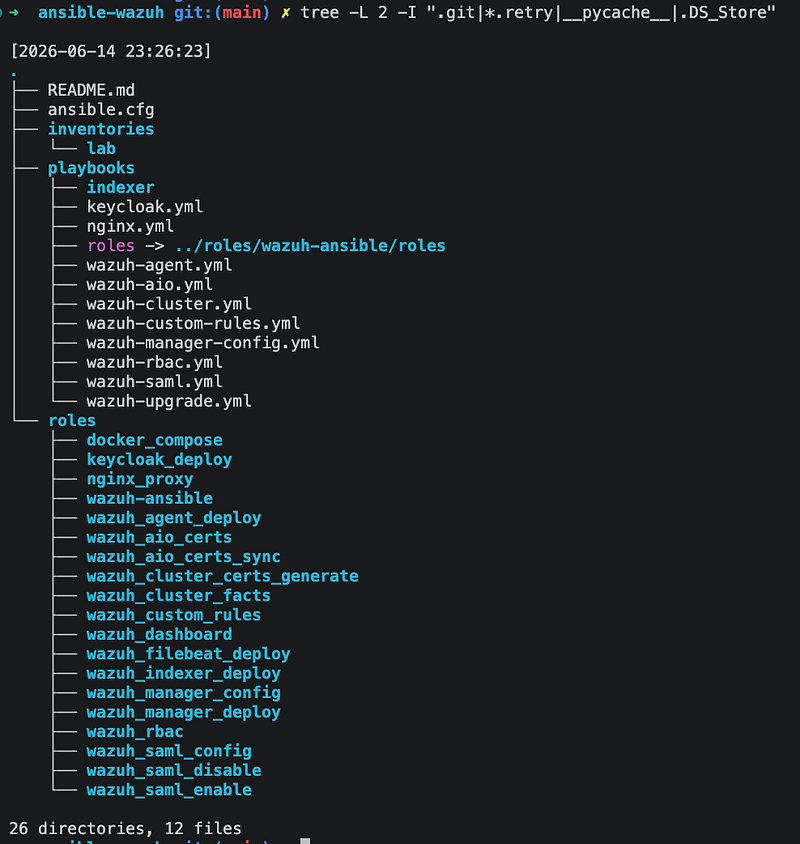
Each directory has a clear responsibility.
text
inventories/          -> environment-specific hosts and variables
playbooks/            -> deployment orchestration
roles/wazuh-ansible/  -> pinned upstream dependency
roles/wazuh_*/        -> local wrapper roles
The important part is that the playbook stays thin.
The playbook should describe the deployment flow. The implementation details should live inside roles.
Inventory Structure
For this first version, I only use one environment:
bash
inventories/labInside the lab inventory, the structure looks like this:
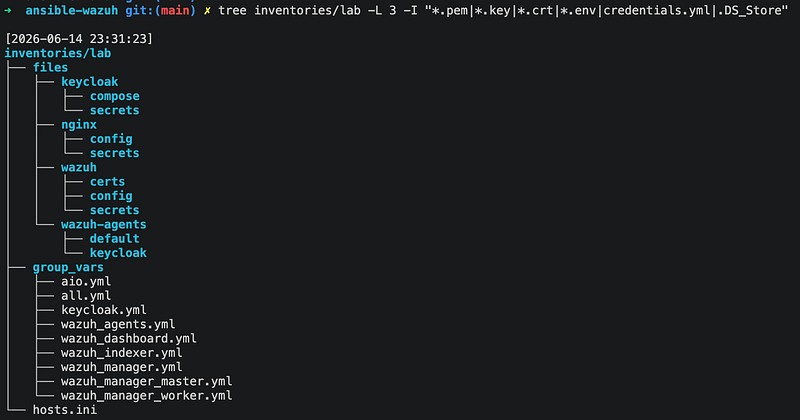
The hosts.ini file defines the target hosts. Prefer private DNS names or private IP addresses reachable through a VPN, bastion, or another controlled management path. Do not expose SSH or Wazuh component ports to the internet solely to make Ansible work.
Example with documentation-only addresses:
ini
[aio]
wazuh-aio ansible_host=10.0.10.15 ec2_name=wazuh-aio
The group_vars directory stores variables for the host groups.
The files directory stores environment-owned, non-secret files. This is important because not every file belongs inside a reusable role. Examples include Wazuh configuration, public SAML metadata, Nginx configuration, public CA certificates, and agent profiles.
Private keys, administrative passwords, SAML client secrets, and enrollment credentials are different. Keep them in Ansible Vault or an external secret manager, restrict access on the controller and target, use no_log: true for tasks that might expose them, and never commit generated private CA material. Wazuh uses the root CA, node certificates, and an administrative certificate to establish trust; the node certificate must cover the DNS name or IP used by peers.
The files structure looks like this:
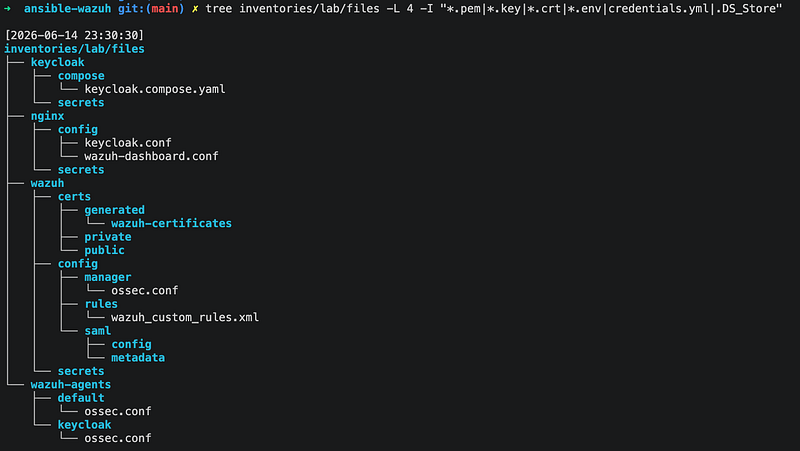
For Part 1, the important idea is simple: inventory describes the environment, while a secret system remains the source of truth for sensitive values.
Later, this structure will be used for custom manager config, custom agent config, suppression rules, SAML files, and internal SSL updates.
Wrapper Roles
I use local wrapper roles to avoid calling upstream Wazuh roles directly from the main playbook.
Examples:
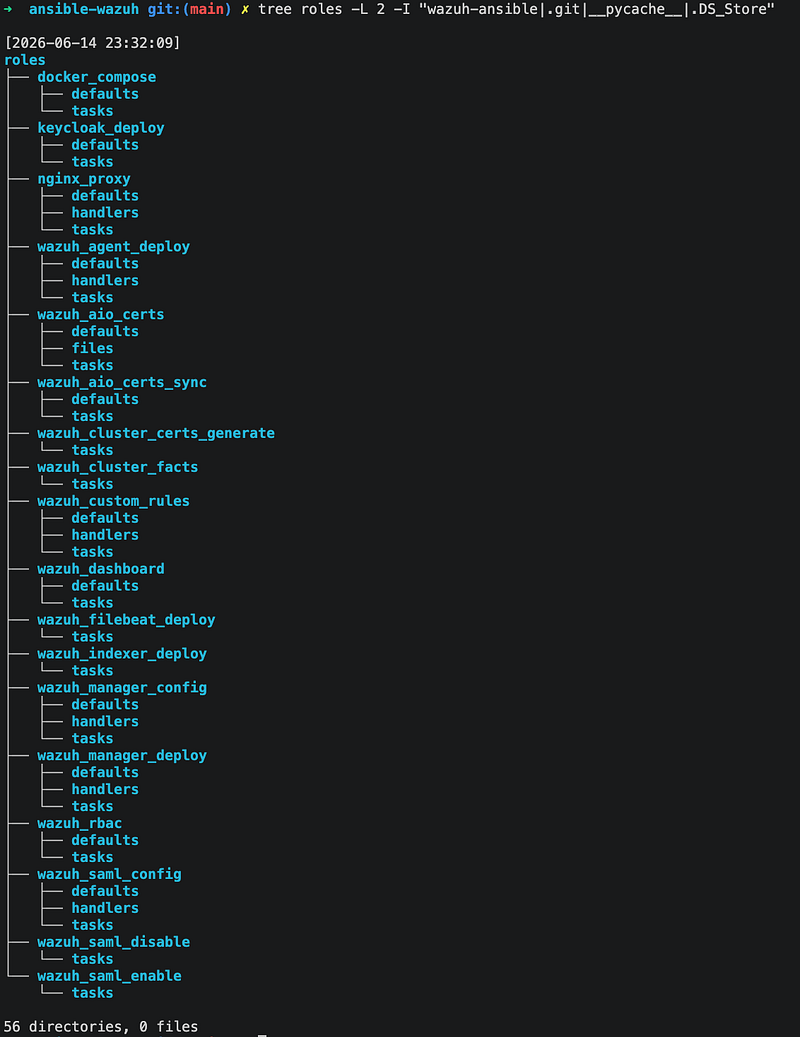
These wrapper roles handle the integration between my repository and the upstream Wazuh roles.
They prepare variables, map inventory paths, retrieve or deploy certificates, call upstream roles, and keep playbooks readable.
For example, instead of putting all indexer deployment logic inside the playbook, I can keep the playbook simple and move the details into:
bash
roles/wazuh_indexer_deployThis makes the repository easier to read because the top-level playbook only shows the sequence.
The detailed implementation is still available, but it is isolated inside the role.
Wazuh All-in-One Deployment Flow
For the first deployment mode, I started with Wazuh All-in-One.
The AIO flow is:
text
1. Prepare certificates
2. Deploy Wazuh indexer
3. Deploy Wazuh manager
4. Deploy Filebeat
5. Deploy Wazuh dashboard
6. Sync runtime certificates
The playbook can stay compact:
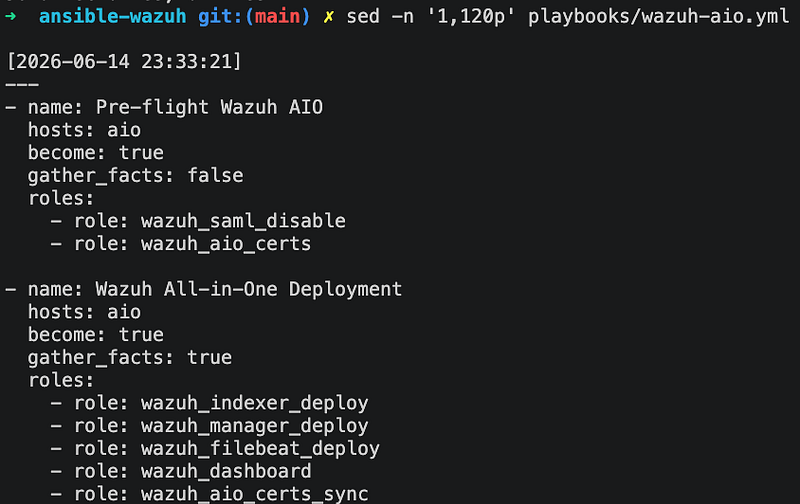
This structure makes the order explicit. Certificate generation is not just a copy step: names and addresses must match the topology, private keys need restrictive ownership, and the root CA must be backed up securely if it will sign replacement or additional node certificates.
The indexer needs to be ready before the dashboard can connect to it. The manager needs Filebeat to ship alerts into the indexer. Certificates need to exist before services are configured.
By keeping this sequence in one playbook, the deployment flow is easy to understand.
By moving the details into roles, the playbook does not become too noisy.
Preflight and Acceptance Checks
Before making changes, I validate the inventory and syntax:
bash
ansible-inventory -i inventories/lab/hosts.ini --graph
ansible-playbook -i inventories/lab/hosts.ini playbooks/wazuh-aio.yml --syntax-check
ansible all -i inventories/lab/hosts.ini -m ping
Ansible check mode is useful only when every included role supports it correctly. Treat --check --diff as an additional signal, not proof that package installation, certificate generation, or service initialization will succeed.
After deployment, I require more than a successful Ansible exit code:
- all expected systemd services are active;
- the authenticated indexer
/_cluster/healthendpoint returns the expected node count and an acceptable shard state; - the Wazuh manager API responds through its intended trust path;
- Filebeat can publish events and fresh Wazuh alerts appear in the indexer;
- the dashboard loads over HTTPS and can query the expected tenant or index pattern;
- a second Ansible run is idempotent or every intentional change is explained.
Do not place API credentials directly in a command or CI log. Load them from the secret system. Validate certificates with the CA (--cacert or the equivalent trust-store configuration) instead of normalizing curl -k; insecure TLS is acceptable only as a tightly scoped diagnostic.
Failure and Rollback Model
All-in-One is a practical lab or small-environment topology, but it is one failure domain. Losing the host can remove collection, storage, and access at the same time; it is not a high-availability design.
Before a change, back up the Wazuh manager data and configuration, indexer data using its supported snapshot procedure, the deployment inventory, and the CA material needed for recovery. Test restoring them. Rollback should use the previously tested dependency pin and configuration from version control—not an unreviewed package downgrade against newer data.
For upgrades, read the Wazuh release and upgrade notes, verify component compatibility, back up first, deploy to a disposable or staging environment, then promote the same pinned artifact. If health or alert-ingestion checks fail, stop the rollout and restore according to the tested recovery plan.
What This Foundation Enables
This first layer is intentionally simple.
It does not try to explain every detail of Wazuh configuration yet.
The main goal is to create a foundation that can support SAML integration with Keycloak, custom Wazuh manager and agent configuration, suppression rules, and internal certificate rotation. These paths become operational interfaces for the later parts, so their ownership and naming need to remain stable.
Because the repository already has clear places for inventory files, wrapper roles, and deployment flows, each future feature can be added without making the base installation harder to understand.
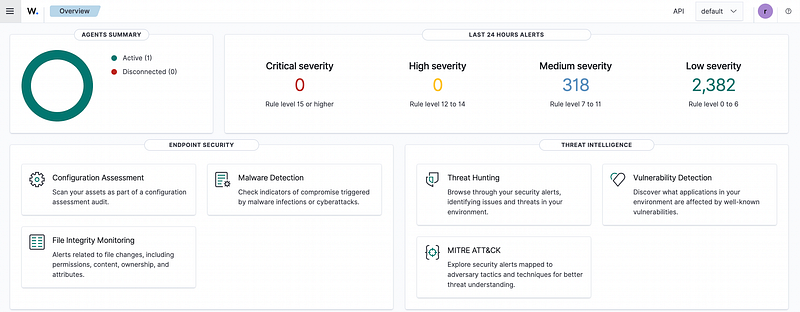
Wazuh dashboard running after the Ansible All-in-One deployment.
For example:
text
wazuh/config/manager     -> manager ossec.conf
wazuh-agents/<profile>   -> agent ossec.conf
wazuh/config/rules       -> custom suppression rules
wazuh/config/saml        -> SAML config and metadata
wazuh/certs              -> public certificates or encrypted inputs only
That is the main benefit of this structure.
The repository is not only prepared for installation. It is prepared for extension.