Kviklet Database Access Control for Audited SQL Workflows
Evaluate Kviklet as an open-source platform for controlled production database access, approval workflows, audit logs, and temporary privileges.
Published · Republished on Medium

The Problem Nobody Talks About
Let’s be honest: your production database access is probably a mess.
Developers Slack the DevOps team at 2 AM asking for urgent query access. Someone copies production credentials into a Notion doc “just for emergencies.” Your compliance team is quietly panicking about audit trails that don’t exist.
Sound familiar?
Kviklet is an open-source option for introducing a request-and-approval workflow around database queries and temporary access. Think of it as a pull-request-style control plane for selected database operations.
It can improve access governance, but installing it does not make an environment compliant or secure by itself. The result still depends on identity controls, database privileges, network boundaries, audit-log retention, backups, monitoring, and tested operating procedures.
What Makes Kviklet Different?
Kviklet sits between your team and your databases, introducing a request-approval workflow that doesn’t sacrifice speed for security. Instead of treating database access as an all-or-nothing proposition, it gives you:
- Request-based query execution — No more shared credentials
- Application audit events — Record request, approval, and execution context
- Role-based approvals — Enforce your actual governance policies
- Multi-database support — PostgreSQL, MySQL, and more
- Self-hosted deployment — Keep the control plane inside your managed environment
Feature availability differs by database type and edition. Verify the current upstream feature matrix and license before relying on temporary access, proxy behavior, explain plans, role-based review gates, SAML, or advanced audit features.
The Architecture: Simple by Design
The architecture is straightforward, but production readiness is not a Docker Compose property. The Compose example below is an isolated evaluation environment, not a production deployment template.
The Core Components
1. Kviklet Application Layer The heart of the system runs as a containerized Spring Boot application. It handles authentication, request workflows, and query execution orchestration.
2. Kviklet Metadata Database A dedicated PostgreSQL instance stores users, connections, requests, approvals, and audit events. Treat it as highly sensitive because it can also contain protected connection material.
3. Target Databases Your actual production (or staging, or dev) databases that Kviklet connects to on behalf of authorized users.
Example Docker Compose Setup
Here is a minimal lab stack. Versions are pinned, databases are not published to the host, and credentials must come from a local secret source excluded from Git.
yaml
services:
  kviklet-postgres:
    image: postgres:16.10
    restart: unless-stopped
    environment:
      POSTGRES_USER: kviklet
      POSTGRES_PASSWORD: ${KVIKLET_METADATA_DB_PASSWORD:?required}
      POSTGRES_DB: kviklet
    volumes:
      - kviklet-postgres-data:/var/lib/postgresql/data
    networks: [control]

  dummy-postgres:
    image: postgres:16.10
    restart: unless-stopped
    environment:
      POSTGRES_USER: lab_owner
      POSTGRES_PASSWORD: ${LAB_DB_PASSWORD:?required}
      POSTGRES_DB: postgres
    volumes:
      - dummy-postgres-data:/var/lib/postgresql/data
      - ./init-multi-db:/docker-entrypoint-initdb.d
    networks: [targets]

  kviklet:
    image: ghcr.io/kviklet/kviklet:0.7.0
    restart: unless-stopped
    depends_on: [kviklet-postgres]
    ports:
      - "127.0.0.1:8088:8080"
    environment:
      SPRING_DATASOURCE_URL: jdbc:postgresql://kviklet-postgres:5432/kviklet
      SPRING_DATASOURCE_USERNAME: kviklet
      SPRING_DATASOURCE_PASSWORD: ${KVIKLET_METADATA_DB_PASSWORD:?required}
      INITIAL_USER_EMAIL: ${KVIKLET_BOOTSTRAP_EMAIL:?required}
      INITIAL_USER_PASSWORD: ${KVIKLET_BOOTSTRAP_PASSWORD:?required}
      ENCRYPTION_ENABLED: "true"
      ENCRYPTION_KEY_CURRENT: ${KVIKLET_ENCRYPTION_KEY:?required}
    networks: [control, targets]

volumes:
  kviklet-postgres-data:
  dummy-postgres-data:

networks:
  control:
  targets:
The upstream project currently documents 0.7.0 as a release example and warns that main can contain regressions. Confirm the current supported release and pin a tested image digest. Promote PostgreSQL and Kviklet upgrades through the same review process.
Environment substitution is suitable for a local lab, but environment variables can be visible to privileged container administrators. In production, inject secrets from the platform secret manager, restrict deployment-metadata access, and keep any .env file outside Git with strict filesystem permissions.
The Multi-Database Scenario
In the example above, we’re simulating a microservices architecture where different teams manage separate databases (service_a, service_b, service_c). This is where Kviklet shines.
Here’s the initialization script that creates our demo environment:
sql
CREATE DATABASE service_a;
CREATE DATABASE service_b;
CREATE DATABASE service_c;

\connect service_a
CREATE TABLE test (
    id SERIAL PRIMARY KEY,
    name TEXT
);
INSERT INTO test (name) VALUES
('Alpha Sequence'),
('Broken Lantern'),
('Crimson Echo'),
('Delta Node'),
('Eternal Flux'),
('Frozen Orbit'),
('Golden Thread');

\connect service_b
CREATE TABLE test (
    id SERIAL PRIMARY KEY,
    name TEXT
);
INSERT INTO test (name) VALUES
('Harbor Pulse'),
('Indigo Signal'),
('Jade Mirror'),
('Kinetic Frost'),
('Lunar Gate'),
('Magnet Warden'),
('Nebula Drift'),
('Obsidian Bloom');

\connect service_c
CREATE TABLE test (
    id SERIAL PRIMARY KEY,
    name TEXT
);
INSERT INTO test (name) VALUES
('Phantom Ember'),
('Quantum Tide'),
('Rift Blossom'),
('Solar Ash'),
('Titan Veil'),
('Umbral Crest'),
('Vortex Bloom'),
('Warden Glyph'),
('Xenon Path');
How It Works in Practice
Scenario: A developer needs to investigate a production data issue in service_b.
Traditional Approach:
- Developer asks for database credentials
- Credentials get shared via Slack
- Developer gains full access with zero oversight
- Query runs, issue resolved
- Developer still has credentials (forever?)
- Audit trail: non-existent
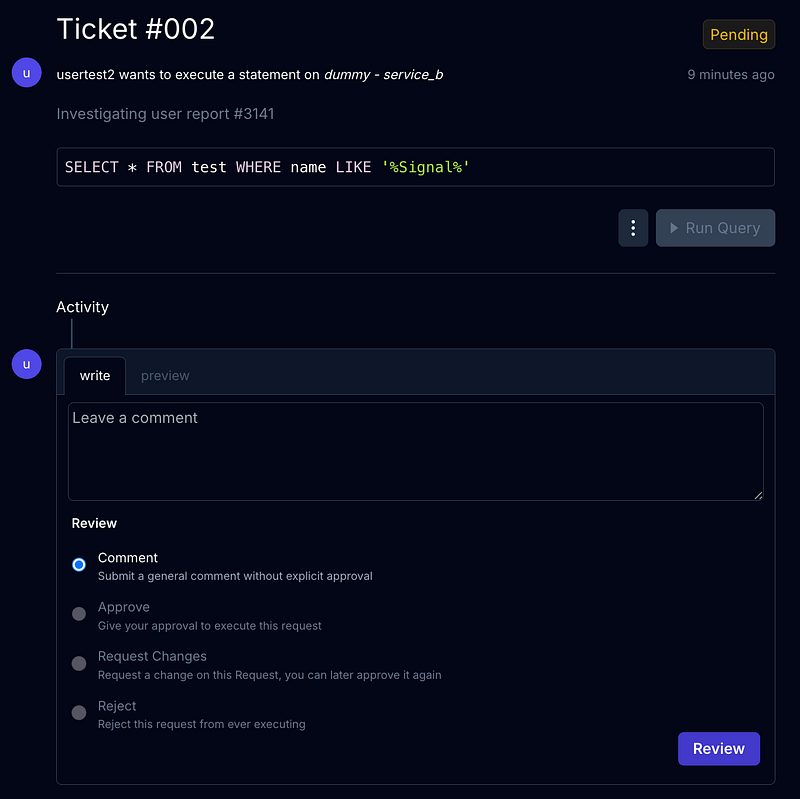
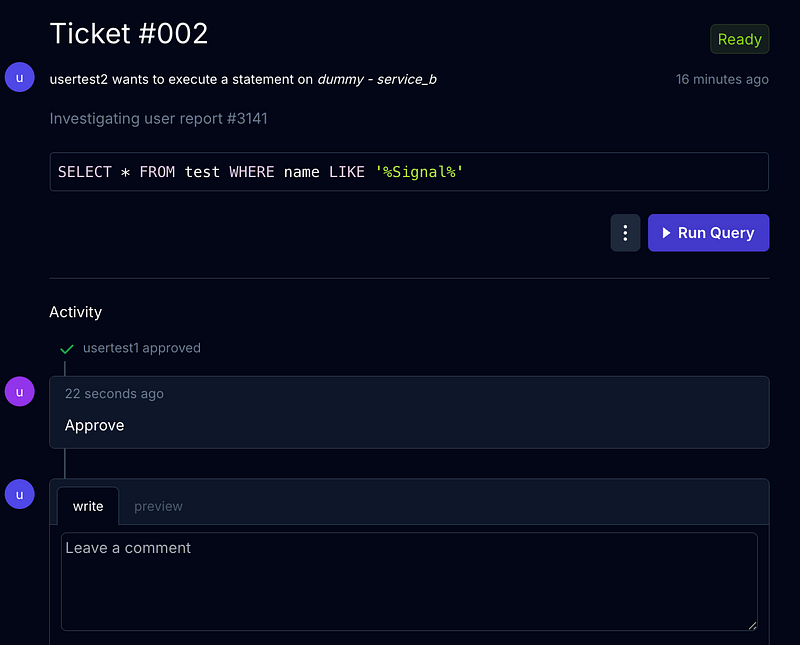
Kviklet Approach:
- Developer logs into Kviklet
- Selects
service_bconnection - Writes query:
SELECT * FROM test WHERE name LIKE '%Signal%' - Submits request with justification: “Investigating user report #3141”
- Team lead receives notification, reviews query
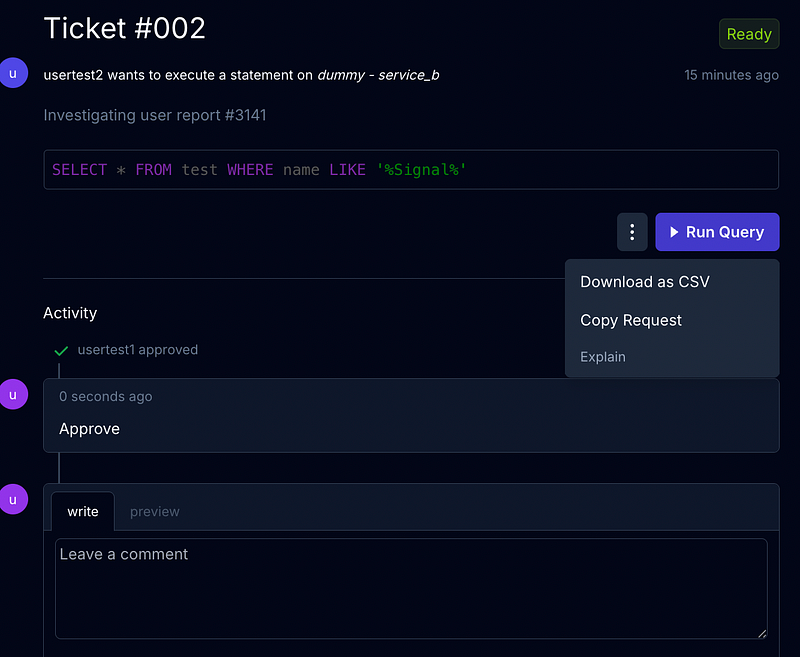
- Approval granted
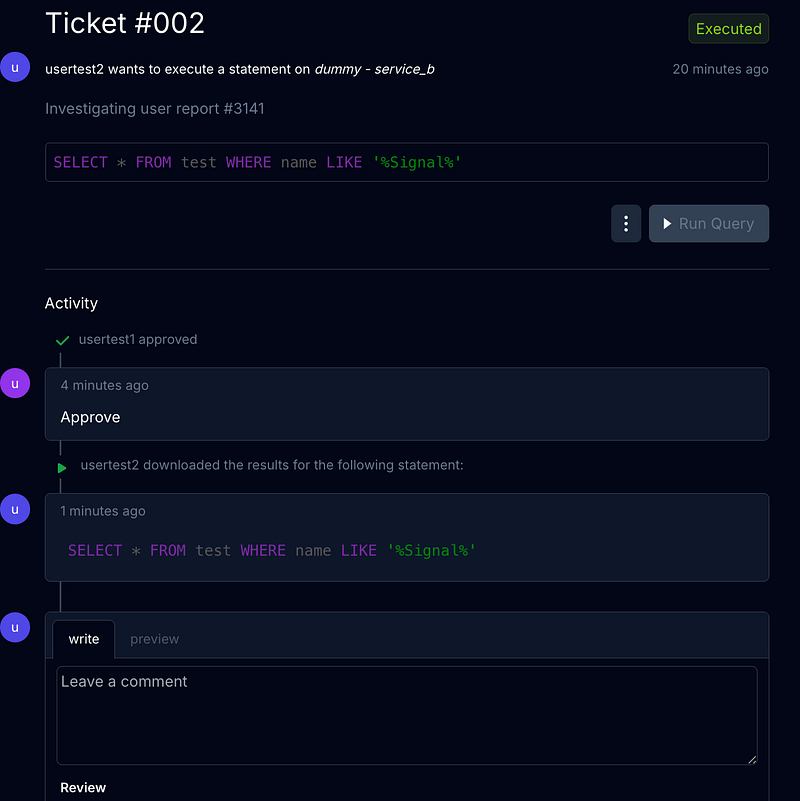
- Results returned to developer
- Kviklet records the application event and approval context
The database's native audit and transaction logs remain important independent evidence. Application logs can be incomplete during defects, administrator misuse, metadata-database failure, proxy incompatibility, or access paths that bypass Kviklet.
Key Technical Highlights
What to validate before production
- Pin and scan the Kviklet image and every dependency.
- Verify supported databases and features against the current upstream matrix.
- Test metadata-database backup and restore, including encryption-key recovery.
- Validate session behavior and migration safety before adding replicas.
- Establish health checks, metrics, logs, alerts, capacity limits, and rollback.
- Test query timeouts, large results, database failover, partial execution, and metadata-store outage.
Security First
- Centralized credentials — Users do not need target credentials, but Kviklet becomes a high-value credential holder
- Controlled execution path — Access is mediated only when network and IAM controls prevent bypass
- Approval workflows — Customizable to your org structure
- Application audit logs — Useful evidence that must be protected and corroborated
Developer-Friendly
- Web-based interface — Place it behind approved private access or a hardened identity-aware edge
- SQL editor with syntax highlighting — Actually pleasant to use
- Request history — Retain and expose it according to data classification
- Integrations — Confirm edition, maturity, and permissions before relying on them
Getting Started
For the isolated lab, create an ignored .env file with unique values, then start the stack:
config
docker compose config
docker compose up -d
curl --fail http://127.0.0.1:8088
Log in with the bootstrap account you supplied. Create durable named administrator accounts or configure SSO, verify access, rotate the bootstrap password, and remove bootstrap variables from later deployments where the application supports that lifecycle. Never deploy documented default credentials.
From here, you’ll:
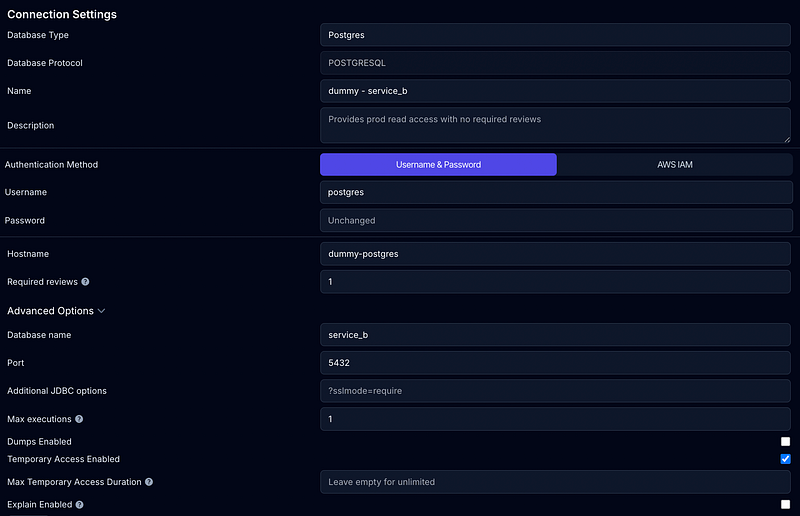
- Add your database connections (PostgreSQL, MySQL, etc.) Here, you can set min reviewers before developer able to run the query
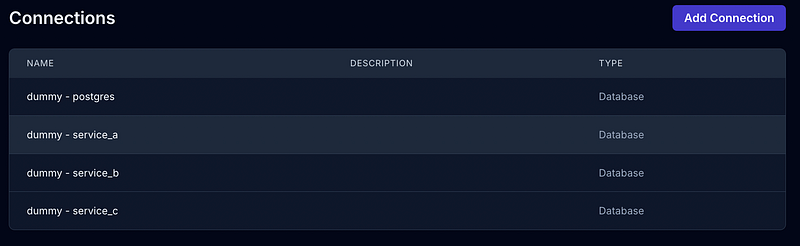
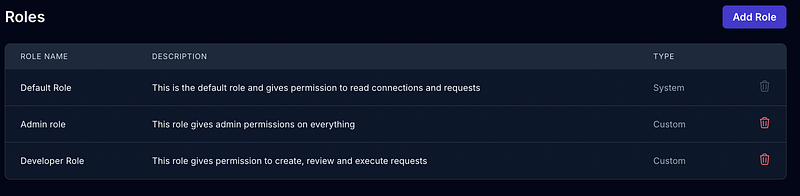
- Configure user roles and approval workflows
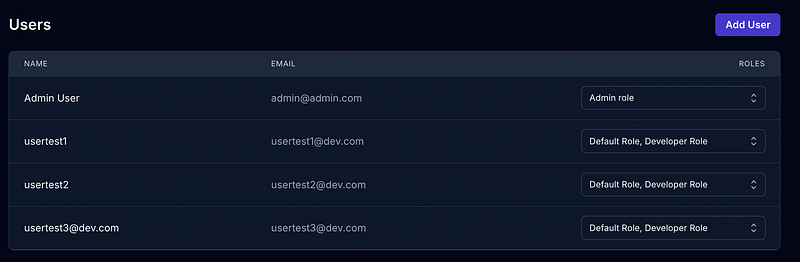
- Invite your team
- Start submitting and approving query requests

Production security controls
TLS, SSO, and session access
Terminate TLS at a hardened reverse proxy or ingress and prevent direct access to the application port. Configure OIDC or LDAP according to current upstream documentation; SAML and some role-sync capabilities may require the enterprise edition. Restrict IdP membership, require MFA, map roles conservatively, and retain a tested break-glass procedure.
If you enable the PostgreSQL proxy, account for the upstream warning that client message parsing has not been tested with every client. Proxy traffic is not encrypted by default unless its TLS options are configured. Validate that every approved client and statement type is logged correctly before relying on it as an audit boundary.
Least-privilege target identities
Create a separate database identity per connection and environment. A read-only investigation connection should have only CONNECT, required schema USAGE, and SELECT on approved objects. Do not connect Kviklet as a database owner or superuser. Use a separate, tightly reviewed path for write or DDL access.
Where supported, prefer short-lived cloud database authentication. Otherwise rotate passwords, require TLS certificate validation, restrict database firewall rules to Kviklet, set statement and connection timeouts, cap returned rows, and protect exported results containing sensitive data.
Approval cannot make an overprivileged database credential safe. The database remains the final authorization boundary.
Metadata and audit durability
Enable Kviklet credential encryption with a high-entropy key stored separately from the metadata database. Back up both the database and the ability to recover the encryption key; test restoration and key rotation. Losing the key can make stored connection credentials unusable, while exposing it with the database defeats the encryption boundary.
Forward audit events to protected centralized storage where practical. Apply retention, immutability, access review, time synchronization, and alerting based on control requirements. Document what is and is not captured—especially query results, failed queries, proxy sessions, administrative changes, and access that bypasses Kviklet.
Failure and recovery testing
Before onboarding production databases, test:
- Identity-provider outage and emergency access.
- Metadata PostgreSQL outage, backup restoration, and schema migration rollback.
- Target database timeout, failover, and a statement that partially succeeds.
- Approval revocation and expiration while a user or proxy session is active.
- Large query results, CSV export controls, and sensitive-data redaction.
- Encryption-key rotation and recovery from the previous key.
- Audit forwarding failure and detection of direct database access outside Kviklet.
Record the exact Kviklet release, database engines, authentication method, proxy clients, and workflows covered by the test. Do not generalize one successful PostgreSQL lab test to every advertised integration.
When Should You Use Kviklet?
Kviklet makes sense when you have:
- Multiple people needing occasional database access — Not everyone needs full DBA rights
- Control requirements — Approval and audit evidence that supports a broader compliance program
- Production data governance concerns — “Who ran that DELETE?” should have an answer
- Microservices with separate databases — Centralize access control
- Distributed teams — Centralized workflows behind an approved access boundary
What’s Next?
This lab is only the beginning. Verify current upstream documentation and edition boundaries for SSO, role-based approval, scheduled execution, API access, and notification integrations before including them in the design.
The core project is open source and self-hosted. That provides deployment control, but your organization also owns patching, availability, backups, monitoring, and incident response. Some capabilities are offered in an enterprise edition.
The Bottom Line
Kviklet is worth evaluating when teams need reviewed, time-bounded database access without distributing production credentials. Its value comes from a controlled workflow, not from treating the product as a complete security or compliance solution.
If you’re tired of sharing production credentials in Slack, if your compliance team is breathing down your neck, or if you just want to sleep better knowing who’s querying your data — give Kviklet a shot.
Start with read-only staging access, validate the audit trail and failure behavior, then expand scope only after the database and platform controls prove effective.
Resources:
- GitHub: github.com/kviklet/kviklet
- Website: kviklet.dev
- PostgreSQL privilege documentation: Privileges